NETGEAR is aware of a growing number of phone and online scams. To learn how to stay safe click here.
Forum Discussion

Mayford5
Feb 10, 2021Aspirant
RBR10 in AP mode 5ghz transmit power not adjustable just grayed out.
Orbi RBR10 is set to AP mode and I am trying to adjust the 5GHZ trasmit power down but it is just grayed out. Is this normal for AP mode. Also, because in AP mode, I do not believe I can telenet as the remote management options are grayed out as well.
Any ideas?
Thank you
5 Replies
- CrimpOnGuru - Experienced User
Mayford5 wrote:Orbi RBR10 is set to AP mode and I am trying to adjust the 5GHZ trasmit power down but it is just grayed out. Is this normal for AP mode. Also, because in AP mode, I do not believe I can telenet as the remote management options are grayed out as well.
This does not match my experience. (Caveat: I do not have an RBR10. BUT see below) On my spare RBR50, I placed it into AP mode and verified:
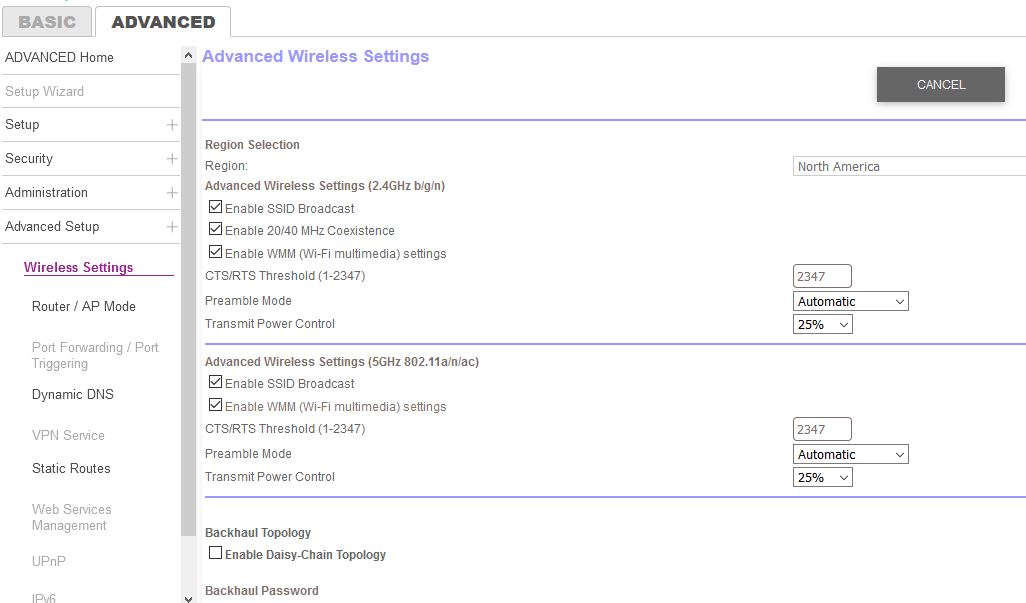
- The Advanced Tab, Advanced Setup, Advanced Wireless Setup allows both the 2.4G and 5G transmit power to be set
(see imaged attached) - The debug screen remains available. I was able to Enable telnet and connect to the Orbi.
There is a Netgear web site that describes which features are not available in AP mode. It says nothing about transmit power.
https://kb.netgear.com/000061277/Disabled-Features-on-the-Orbi-when-set-to-AP-Mode
BUT... the RBR10 is a product intended to compete "head to head" with Google WiFi. (It is the least costly Orbi.) There is only one 5G radio, which is used both for user device connections and for satellite backhaul. As far as I am aware, this is the only Orbi that is "Dual Band" rather than "Tri Band". My guess is that on the RBR10 the engineers do not want anything to compromise the satellite backhaul, so the 5G radio may be set permanently to "full power".
- Mayford5Aspirant
Thank you for your response. I believe the only thing I see different in your setup is the Daisy Chain option you have disabled. I have this enabled. Is there a benefit for this to be disabled? I believe this is meant for using backhaul from one sattelite to the next yes? As I am not using any sattelites because the 5G is stuck on full and I have roam hop, I belive I could turn that off.
I have a house that is about 1900sq ft. of space but really bad tenuation because it was built in the 1930s. The 5GHz is visible but weak and my devices that join that band don't always connect to it. However, it is just strong enough that when they do connect properly and I have a sattelite they roam hop and cannot decide which to connect to. The 2.4GHz is strong even though it is set down to 25%.
Thank you again
- CrimpOnGuru - Experienced User
Yes, I disabled Daisy Chain because my two satellite both connect directly to the router. Enabling Daisy Chain activates another 5G backhaul SSID, which is not necessary in my case. (I have no idea if that additional SSID would 'interfere' with anything, but I am a bit OCD about WiFi and got rid of it by disabling Daisy Chain.)
If the goal was to increase 5G transmit power, my guess is that it is already set as high as legally allowed because of the backhaul link.
The RBR10 is a "different animal". There was a post some months back wanting to change the 5G backhaul channel, which is impossible because it is the same channel as for the 5G users.
- The Advanced Tab, Advanced Setup, Advanced Wireless Setup allows both the 2.4G and 5G transmit power to be set