NETGEAR is aware of a growing number of phone and online scams. To learn how to stay safe click here.
Forum Discussion

TC10
Apr 29, 2021Tutor
RBR50 basic Internet status glitch (
RBR50 with current firmware V2.7.2.104 Is anyone else getting this glitch on the basic status page? I continuely get this error that I am not connected to the Internet even though I am connected....

FURRYe38
Apr 29, 2021Guru - Experienced User
What is the Mfr and model# of the Internet Service Providers modem/ONT the NG router is connected too?
Please use the Choose File button when you post to include your capture files as these can be downloaded and reviewed. Inline Pictures have to be approved by the forum moderator.

TC10
Apr 29, 2021Tutor
The Shaw modem info
https://support.shaw.ca/t5/internet-articles/hardware-information-hitron-cgnm-2250-docsis-3-0-wifi-modem/ta-p/6289#content-section-1

- FURRYe38Apr 29, 2021Guru - Experienced User
Your ISP Modem already has a built in router and wifi. This would be a double NAT (two router) condition which isn't recommended. https://kb.netgear.com/30186/What-is-Double-NAT
https://kb.netgear.com/30187/How-to-fix-issues-with-Double-NAT
Couple of options,
1. Configure the modem for transparent bridge or modem only mode. Then use the Orbi router in router mode. You'll need to contact the ISP for help and information in regards to the modem being bridged correctly.
2. If you can't bridge the modem, disable ALL wifi radios on the modem, configure the modems DMZ/ExposedHost or IP Pass-Through for the IP address the Orbi router gets from the modem. Then you can use the Orbi router in Router mode.
3. Or disable all wifi radios on the modem and connect the Orbi router to the modem, configure AP mode on the Orbi router. https://kb.netgear.com/31218/How-do-I-configure-my-Orbi-router-to-act-as-an-access-point and https://www.youtube.com/watch?v=H7LOcJ8GdDo&app=desktopI would also power OFF the ISP modem and RBR for 30 seconds, then back ON with the modem first, then RBR.
- TC10Apr 29, 2021Tutor
FURRYe38
I have 4 Nestcams that will only run on 2.4GHz network in Canada. I also live in an older stucco (faraday interference) house with an addition so the wifi does not get around the house.
End result is that I require 3 wifi networks for the Nestcams in different areas of our home.
So I need the Orbi network for 1 Nestcam, the Shaw Hitron wifi network for another Nestcam and I have a Dlink powerline wifi for 2 more Nestcams. All working fine, currently.
These Nestcams have been working fine (mostly) for a few years until recent Orbi network upgrades.
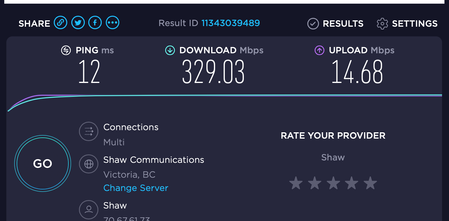
The Nestcams are all working fine, I just get the orbi sometimes flashing white, sometime magenta and this glitch even though the Orbi is showing 130Mb download and 15Mb upload in the Orbi RBR50 speedtest in browser and iPhone app.
Also "I would also power OFF the ISP modem and RBR for 30 seconds, then back ON with the modem first, then RBR. " I have doen this several times.- FURRYe38Apr 29, 2021Guru - Experienced User
I'd try one of the suggestions mentioned. Your ISP Modem/router maybe causing this. I'm on v104 and have not seen this ever, however I don't have a modem/router online currenly with my RBK50.
TC10 wrote:FURRYe38
I have 4 Nestcams that will only run on 2.4GHz network in Canada. I also live in an older stucco (faraday interference) house with an addition so the wifi does not get around the house.
End result is that I require 3 wifi networks for the Nestcams in different areas of our home.
So I need the Orbi network for 1 Nestcam, the Shaw Hitron wifi network for another Nestcam and I have a Dlink powerline wifi for 2 more Nestcams. All working fine, currently.
These Nestcams have been working fine (mostly) for a few years until recent Orbi network upgrades.
The Nestcams are all working fine, I just get the orbi sometimes flashing white, sometime magenta and this glitch even though the Orbi is showing 130Mb download and 15Mb upload in the Orbi RBR50 speedtest in browser and iPhone app.
Also "I would also power OFF the ISP modem and RBR for 30 seconds, then back ON with the modem first, then RBR. " I have doen this several times.