NETGEAR is aware of a growing number of phone and online scams. To learn how to stay safe click here.
Forum Discussion

pzmosquito
Jul 15, 2021Aspirant
RBR50 inconsistent WAN port speed
ok, first let me say that I've been searching for similar issue on the forum, but mine is a little different. I've been running RBK53 for about 2 years with 500/500 Internet speed and everything ...
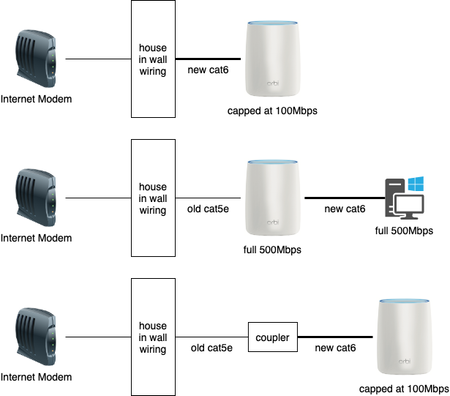
pzmosquito
Jul 15, 2021Aspirant
somehow the diagram didn't show in the original post, I'm adding it as attachment here


FURRYe38
Jul 15, 2021Guru - Experienced User
What happens if you go direct from Modem to back of RBR, not thru in wall wiring or any coupler?
What Firmware version is currently loaded?
What is the Mfr and model# of the Internet Service Providers modem/ONT the NG router is connected too?
- pzmosquitoJul 15, 2021Aspirant
Unfortunately I can't, the modelm is outside the house. But it's a good idea to try, I'll take my router outside to give it a try.
Firmware is 2.7.3.22
ISP modem is ARRIS ONT1000GI4-FTR (REV 0A)
- pzmosquitoJul 15, 2021Aspirant
UPDATE, I tried connecting from modem to router directly with the new cat6 cable, it's at full 500Mbps speed.
I also tried replacing the coupler with a switch, and it's running at full speed. So it looks like the both in wall wiring ports and the coupler are not able to negotiate 1Gbps with the new cat6 cable. Hmm...
- FURRYe38Jul 15, 2021Guru - Experienced User
Need to see what kind of cable is in all. Also check termnation jacks as well.
Glad the switch helped in place of the coupler.- pzmosquitoJul 15, 2021Aspirant
Yeah, it looks like there's not much I can do except trying different cat6 cables for compatibility reason.
Thanks FURRYe38 for all the suggestions!