NETGEAR is aware of a growing number of phone and online scams. To learn how to stay safe click here.
Forum Discussion

jamesjwd
Nov 03, 2023Aspirant
RBR50 OpenVPN has the right IP but cannot access Network Resources
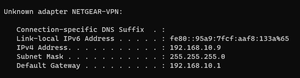
I am trying to set up OpenVPN to Orbi Router. Using OpenVPN GUI because the updated OpenVPN Connect doesn't support TAP, and it seems Orbi Router only has the TAP configuration for download. ...

CrimpOn
Nov 03, 2023Guru - Experienced User
To use OpenVPN Connect, one would use a text editor to change the ovpn file from tap to tun by editing these lines:
client
dev tap ----- change to tun
proto udp
dev-node NETGEAR-VPN
remote xxx.mynetgear.com  12974 ----change to 12973
resolv-retry infinite
nobind
persist-key
persist-tun
ca ca.crt
cert client.crt
key client.key
cipher AES-128-CBC
comp-lzo
verb 0
sndbuf 393216
rcvbuf 393216
route-method exe
Are you connecting to the Orbi web interface using the URL or IP address? 192.168.10.1
jamesjwd
Nov 03, 2023Aspirant
Ok. Will Give that File a Try.
Thank you very much.
- CrimpOnNov 03, 2023Guru - Experienced User
There are differences between tap and tun connections (see the Wikipedia article).
Since the connection is "working" in the sense that the device appears in the Orbi Attached Devices page as a VPN connection, my guess is that the regular Windows connection practices may not function over VPN.