NETGEAR is aware of a growing number of phone and online scams. To learn how to stay safe click here.
Forum Discussion

dismay
Feb 08, 2022Aspirant
RBR50 Port forwarding not working
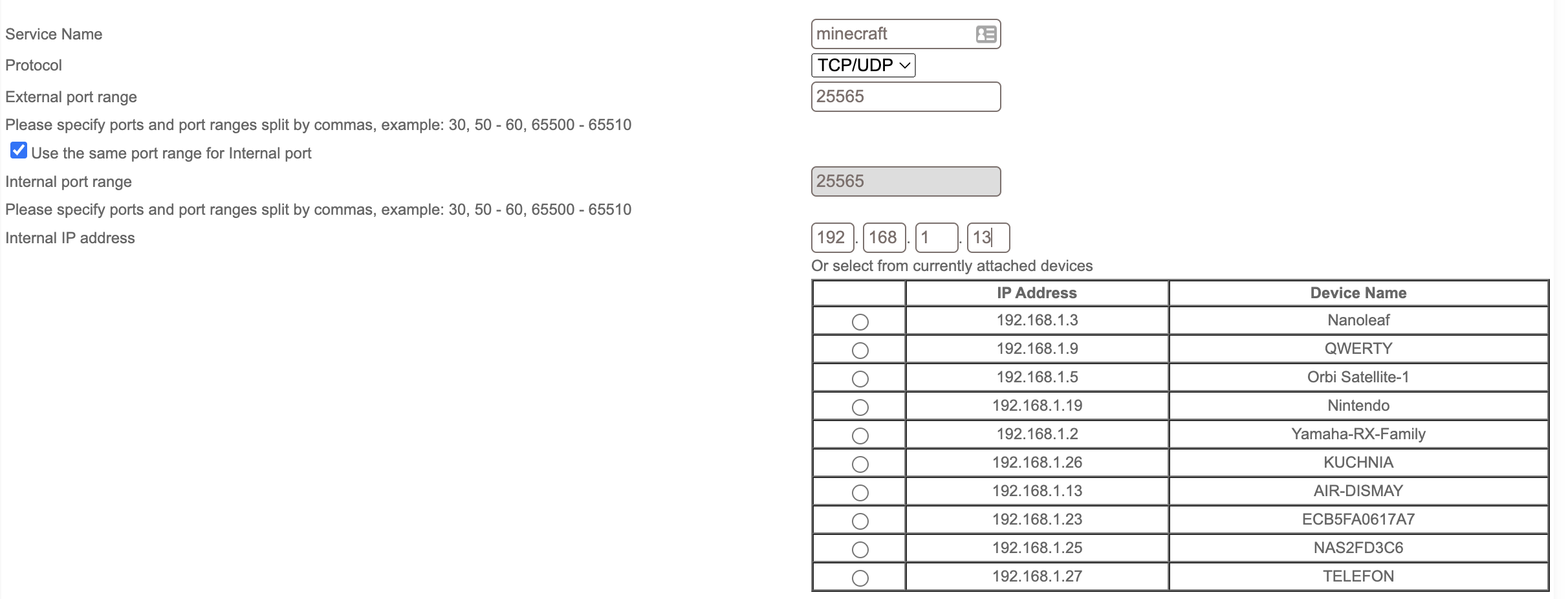
Hi, I'm trying to set up an minecraft server for me and my friends at school and i need to port forward port number 25565, but it doesnt work. My router from ISP is in bridge mode, im not using D...

CrimpOn
Feb 08, 2022Guru - Experienced User
(I am running out of ideas.....)
The port being reported "Closed" rather than "Stealth" would seem to indicate that the connection got passed through the router to the computer on the LAN and then rather than simply disappearing, was reported "Closed".
Thoughts:
- Is the MInecraft server actually listening on port 25565?
On Windows, I use a tool called TCPView by Sysinternals
https://docs.microsoft.com/en-us/sysinternals/downloads/tcpview
This program displays every process on the computer that is active on TCP or UDP and what state it is in.
(Be prepared for a shock when you see how much is "going on" in the background.)
If the Minecraft Server is actively listening for connections, there should be a process listening on port 25565.
There may be a similar tool for MacOS. - Is there something special about a Minecraft connection? Does the connection packet have to include some parmeter or value?
(I'm sure there is probably a login of some type, but that comes after a connection is established.) - Can the connection be captured? On Windows, I use Wireshark to capture every packet that flows through the ethernet adapter. I would expect to see that connection attempt on port 25565. (There is also Wireshark for MacOS if you are more comfortable with that platform.)
- What about capturing using the router? On the debug page, Orbi has an option to Enable LAN/WAN Packet Capture. After starting the capture, try the connection attempt (or use Gibson), then Save the debug file. It produces a zip file and inside there are two pcap files: lan.pcap and wan.pcap. I use Wireshark to open them. On the LAN capture, there should be a packet from the internet directed to the Minecraft Server as well as a packet from the Minecraft server closing the connection.
If packets get to the Minecraft server computer, then I think it is not the router.
Articles on the web seem to indicate that setting up a Minecraft server is "so easy." Doesn't look so easy to me.
dismay
Feb 08, 2022Aspirant
Didnt want to wake up the family by turning the PC on and checking does the minecraft server works, i will try tomorrow. But i found this in logs tab in orbi admin panel. When i look if the port is closed or not this shows up in logs.
[LAN access from remote] from 198.199.98.246:34723 to 192.168.1.6:25565, Wednesday, February 09, 2022 00:05:351
- CrimpOnFeb 08, 2022Guru - Experienced User
Cool. I did not think to look in the logs. Looks like the router is forwarding packets correctly and the issue is with the server.
(You have saved me more investigation. My next step was to Forward a port to my PC, start up packet capture, then attempt to connect and "see what happens".