NETGEAR is aware of a growing number of phone and online scams. To learn how to stay safe click here.
Forum Discussion

dismay
Feb 08, 2022Aspirant
RBR50 Port forwarding not working
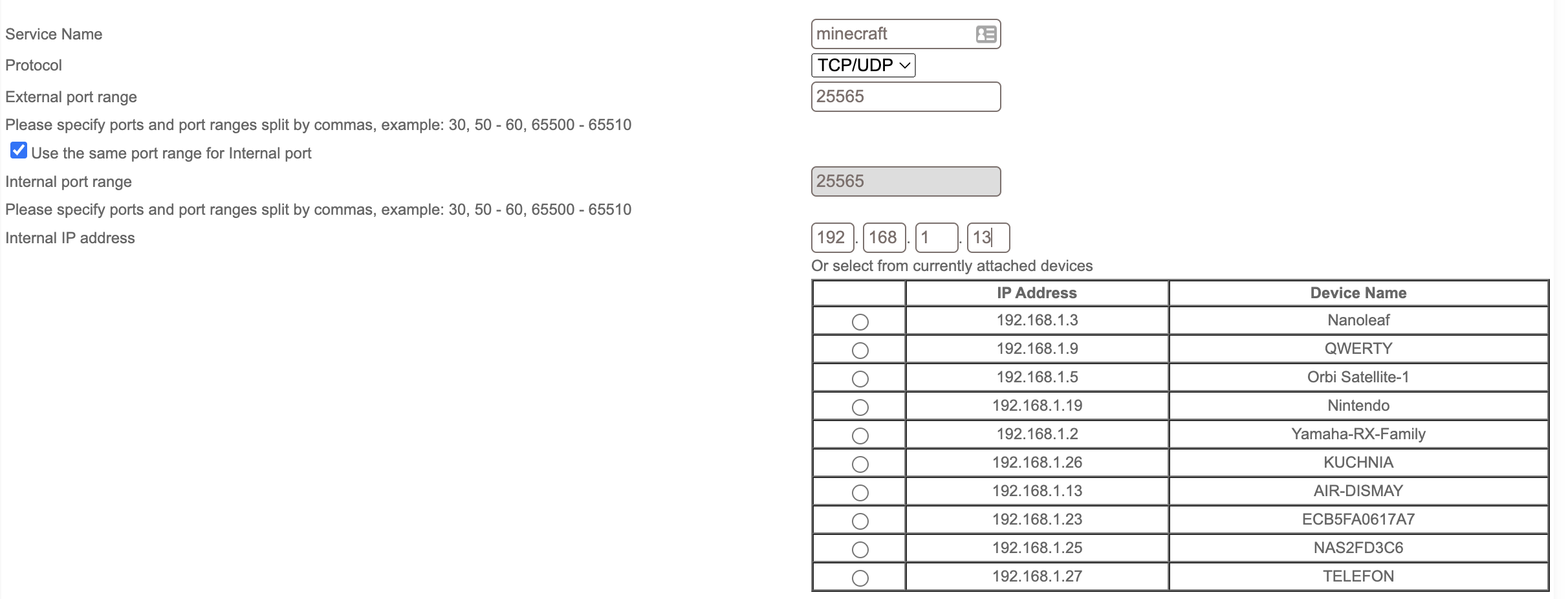
Hi, I'm trying to set up an minecraft server for me and my friends at school and i need to port forward port number 25565, but it doesnt work. My router from ISP is in bridge mode, im not using D...

CrimpOn
Feb 08, 2022Guru - Experienced User
(I am running out of ideas.....)
The port being reported "Closed" rather than "Stealth" would seem to indicate that the connection got passed through the router to the computer on the LAN and then rather than simply disappearing, was reported "Closed".
Thoughts:
- Is the MInecraft server actually listening on port 25565?
On Windows, I use a tool called TCPView by Sysinternals
https://docs.microsoft.com/en-us/sysinternals/downloads/tcpview
This program displays every process on the computer that is active on TCP or UDP and what state it is in.
(Be prepared for a shock when you see how much is "going on" in the background.)
If the Minecraft Server is actively listening for connections, there should be a process listening on port 25565.
There may be a similar tool for MacOS. - Is there something special about a Minecraft connection? Does the connection packet have to include some parmeter or value?
(I'm sure there is probably a login of some type, but that comes after a connection is established.) - Can the connection be captured? On Windows, I use Wireshark to capture every packet that flows through the ethernet adapter. I would expect to see that connection attempt on port 25565. (There is also Wireshark for MacOS if you are more comfortable with that platform.)
- What about capturing using the router? On the debug page, Orbi has an option to Enable LAN/WAN Packet Capture. After starting the capture, try the connection attempt (or use Gibson), then Save the debug file. It produces a zip file and inside there are two pcap files: lan.pcap and wan.pcap. I use Wireshark to open them. On the LAN capture, there should be a packet from the internet directed to the Minecraft Server as well as a packet from the Minecraft server closing the connection.
If packets get to the Minecraft server computer, then I think it is not the router.
Articles on the web seem to indicate that setting up a Minecraft server is "so easy." Doesn't look so easy to me.
dismay
Feb 08, 2022Aspirant
. IT FINALLY WORKED
dont know how because didnt make any changes to the router just installed wireshark on my mac, but its working. Thank you very much, i have been struggling with this for so long. also sorry for my bad english but im 12 years old and hope that doesnt bodder you. i run and succesfully joined the server on my macbook at 10fps by using my public IP so my friend will be able to also join. wireshark shows that the port is forwarded from 25565 to my local port or somethink. thank you so much again. but the port checker is showing that the port 25565 is "OPEN!" in red so i dont think its good, but for now its working.
Thank you again,
Have a nice day.
- CrimpOnFeb 08, 2022Guru - Experienced User
Congratulations! We have people on the forum claiming to be "IT Techs" who could not do nearly as well as you have.
Open (in Red) is meant to be a warning. Within minutes of a port being forwarded through the router, bots will discover it and begin to probe. I usually test forwarding issues by forwarding port 80 to my Pi-hole server. Within less than five minutes there will be connections from all over the internet. (Once I have accomplished the task, I remove the forward.)
So, people will recognize that port 25565 is a Minecraft server and will begin to attempt to break into it. The Orbi log file will fill up with connections. With thousands of people hosting Minecraft, I would expect that it is more "secure" than many servers. For example, plain FTP sends the user name and password across the internet in plain text. And, a lot of people set up servers with really stupid user names and passwords.
Open is like saying, "The side door to your house is open." As long as there is a huge guard dog just inside and there is nothing to steal or break in that part of the house, one might say, "so what?"
Good Luck
- dismayFeb 08, 2022AspirantOk, thank you again.
As you said the logs are filling up. I’m not sure to be worried about the port being in red, do you know how to make it green? I’m also seeing and [DoS Attack] in logs not sure is it the same thing as ddos. But definitely not wanting to be ddosed.
Thank you - CrimpOnFeb 08, 2022Guru - Experienced User
Web sites like Shields Up! will report any open port as a potential danger.
They prefer "stealth".
Imagine you go by a house and find:
- There is a door, and it is wide open. You can walk in. That merits RED.
- There is a door, but you can't open it. That rates BLUE because maybe if you tried hard enough you could break in.
- You can't tell if there is a door or not. Maybe one is hidden somehow. Or maybe there is no door at all. This gets GREEN How do I break in if I cannot find a door?
In order by security, Green is more secure than Blue, and Blue is more secure than Red.
- dismayFeb 09, 2022Aspirant
Hey im back,
Thank you for the explanation but i already read on the gibson page what does the colors mean, but i have few more questions.
How do i make an stealth port do i need to make some changes on the router or on client side. And i noticed that the port is open on mac, but not on windows. This means that i need to make some changes to the windows computer.
Now i will try those methods that you said before
Thank you
- dismayFeb 09, 2022Aspirant
EDIT: Did make some changes to the firewall on windows now it is working the port status on gibson is open.
Minecraft Server works, thank you. Only thing left is how do i make an stealth port?
Thank you
- CrimpOnFeb 09, 2022Guru - Experienced User
dismay wrote:
EDIT: Did make some changes to the firewall on windows now it is working the port status on gibson is open.
Minecraft Server works, thank you. Only thing left is how do i make an stealth port?
The default firewall rule is to ignore connections attempts. That is what Gibson reports as "stealth" (because the connection attempt simply "dies"). But a stealth port means that no one can connect to it.
In order for someone on the internet to access the Minecraft server, the port must be "open". By definition, an open port is vulnerable to attack. It's just part of offering a service on the internet.