NETGEAR is aware of a growing number of phone and online scams. To learn how to stay safe click here.
Forum Discussion

hollang
Jan 13, 2019Tutor
RBR50 ReadySHARE USB Printer
I have Orbi RBR50 with two satellites. From a wifi perspective it works great, but for the life of me I can't get a HP CP3252 Color Laser Jet printer to work over the USB port on the back of the sate...
 Jan 13, 2019
Thanks again. In the interim, I uninstalled the driver and the ReadyShare software and reinstalled them and now it's working correctly. Guess some kind of conflict occurred. So, I thik I'll just stick with the USB connection as I don't use this color LJ very often.

FURRYe38
Jan 13, 2019Guru - Experienced User
I would review this to see if anything helps here:
https://www.netgear.com/support/product/ReadySHARE_USB_Printer.aspx
Also your printer has a LAN port on the back. I might work better to connect the printer via LAN port to the Orbi and then install drivers on your PCs and direct the drivers to the IP address the printer gets from the router.
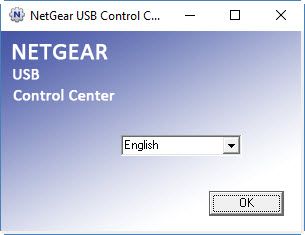
- hollangJan 13, 2019TutorThanks. I’d reviewed that information, downloaded & installed the app with no complaints but it’s not operating as described. I get the language prompt screen but nothing follows it. I would use an Ethernet port but I need them all. Maybe I can connect up an energy switch to get more ports. …? Thanks, though for your inputs.
- FURRYe38Jan 13, 2019Guru - Experienced User
Possible something wrong with the app. Maybe a forum moderator can help.
Yes you can add a external Gb network switch to the back fo the Orbi router for more ports. I have a 24port and several smaller switches behind my router. Non managed, non smart and non green eithernet is preferred. NG GS308 or D-Link DGS 108/105 or HP 1400 series works great.
- hollangJan 13, 2019TutorI assume I can use something slower than a Gb switch like a 100 Mb or even older 10 Mb device. Will try that next. Just have to find power adapters for my old switchs