NETGEAR is aware of a growing number of phone and online scams. To learn how to stay safe click here.
Forum Discussion

Atlixnor
Oct 16, 2023Guide
RBR50 v2 firmware update -automatic upgrade not working. Need advice, please
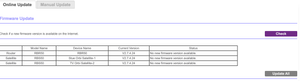
Why is the GUI automatic fw update not finding a new firmware? The current fw is 2.7.4.24, and I am based in Europe. Is this the reason the automatic fw is not working? I want to upgrade ...

CrimpOn
Oct 17, 2023Guru - Experienced User
On the RBR50, there is an option to disable broadcasting the SSID on 5GHz. If you "forget" the Orbi WiFi, perhaps it will detect only the 2.4G SSID and connect to it. (newer models of Orbi removed this feature. Those of us "stuck in the past" still have it.)
My guess is that every device already connected at 5G will remain connected, and only the Pixel 8 will come up with only the 2.4G SSID. (Or, the whole network could go to hell. Or... the Pixel 8 will attempt to connect to a 5G WiFi anyway???)
I would try it just to see what happens.
p.s. Sounds like Google is motivated. What do you have to lose?
Atlixnor
Dec 18, 2023Guide
Hmm.I want to downgrade from 2.7.54. The reason is that Google said they fixed this issue in their December update, and it didn´t. And today I discovered that aslo Samsung devices have a problem with disconnecting and connecting on this latest version. Which version should I downgrade to? And can I just install like I did when upgrading? Satellites first. then the router.
I see there is a new fw. Will try that first, but is it ok to downgrade also like I described?
I see it only adresses SPC bugs? What is that? and Armor bugs. Maybe not worth trying the new one, then?
- CrimpOnDec 18, 2023Guru - Experienced User
v2.7.5.4 is the latest firmware (released in Feb, 2023). If you look closely at the Orbi web management, there is probably a period between the 5 and 4 on your router firmware version.
Yes, any manual firmware update works the same way
- Download and upzip
- Connect to each satellite web interface and upload firmware
- Connect to router web interface and upload firmware
There is one "gotcha" lurking. Whereas Netgear finally added a feature to the AX series products to allow the user to enable/disable Automatic Firmware (without asking if the user wants to do so), that feature is not present on the RBR50 product. If Netgear finally decides, "It's time", they can push v2.7.5.4 onto your system. (or any newer version than the one you loaded)
I am aware of a major crisis involving the newest version of iOS (17) and lots of WiFi systems (not just Netgear). Am not aware of any issue with Android/Wiindows problems. My RBR50 has been on v2.7.5.4 since last February and all my Android/Windows/Apple/Nest devices work just fine.
- AtlixnorDec 18, 2023Guide
My disconnection stopped on the Samsung S21 when I reverted back to 2.7.4.24
Now I will have to stop the store from sending my Pixel 8 Pro to google for investigation. There is a chance now that their December update actually fixed my problem, so have to extinguish that possibility before they wipe my device and maybe say nothing is wrong with it.
- AtlixnorDec 20, 2023Guide
So I reset to factory settings. So far all devices are stable (Also Google Pixel 8 Pro). Wifi channel is Auto. I notice the advanced wifi settings for default are quite different from what was recommended here some years back. What should I tweak there as a minimum? I do not want to cause any instability again.
- CrimpOnDec 20, 2023Guru - Experienced User
If it ain't broke, don't fix it.
- AtlixnorDec 20, 2023GuideIt actually still drops...So need to do some tweaking. If it keeps dropping I will bring everything to my cabin and setup once more, and if it still drops there, I have a case with the retail store.
