NETGEAR is aware of a growing number of phone and online scams. To learn how to stay safe click here.
Forum Discussion

CliffP
Aug 12, 2020Guide
RBS-50 firmware of V9.2.5.1.18SF-HW says no update available
I've had RBK-50 (router + 1 satellite) for a number of years and bought 2 more RBS-50 satellites from a friend. He said he bought his as a 3-pack (router + 2 satellites) even before I bought my 2-pac...
CliffP
Aug 15, 2020Guide
Thanks for all the help! I don't know what special firmware (or person) that is, but I want it to factory so it can get continual updates without my intervention.
Turns out the router was somehow at the latest firmware even though I didn't plug it in until today.
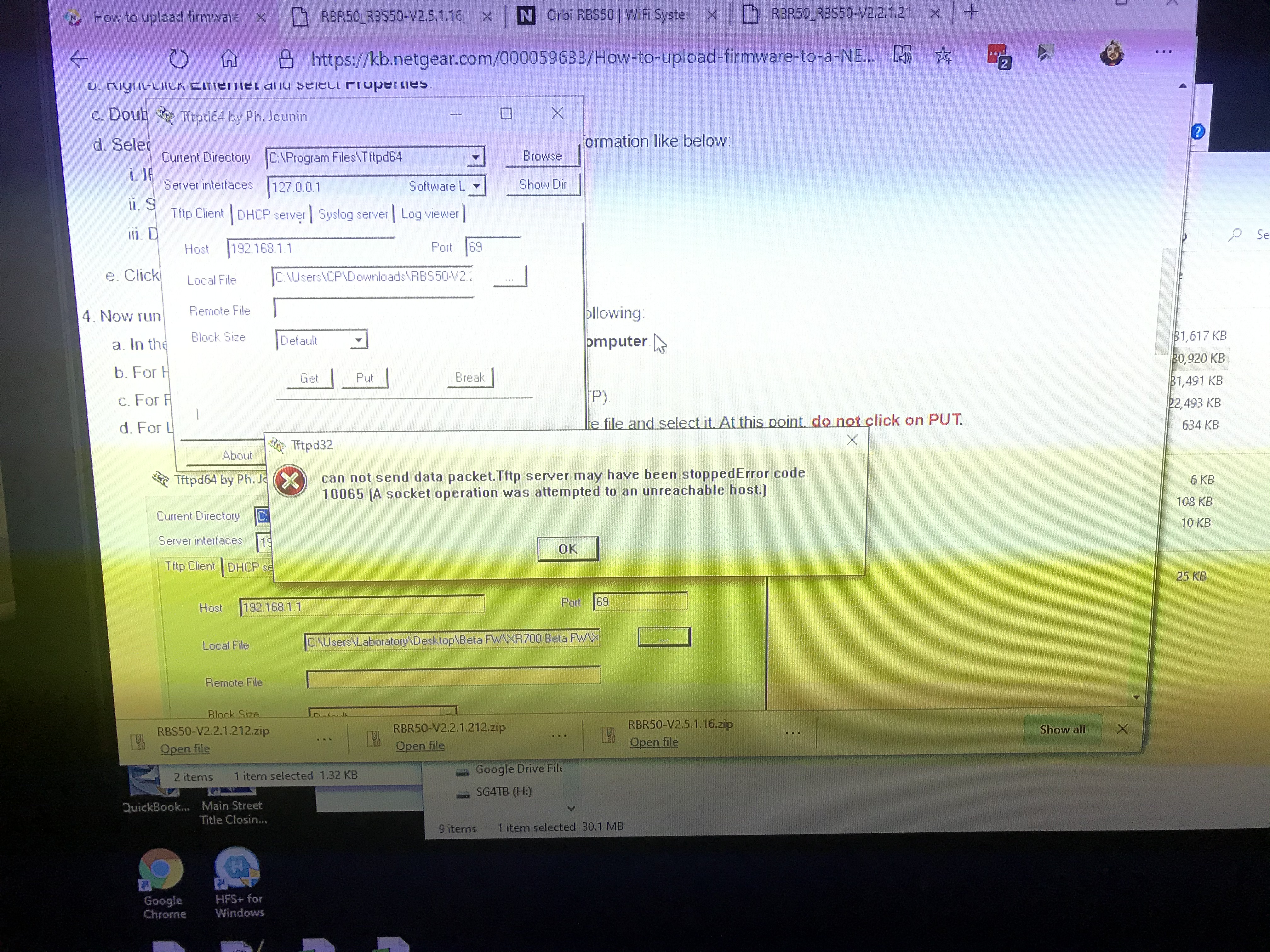
The version I mentioned before was for the satellites. When I plug in the ethernet cord from PC to Satellite and try to send the firmware update manually, I get this error:
can not send data packet. Tftp server may have been stopped. Error code 10065 (A socket operation was attempted to an unreachable host.)
(Image of error is attached)
Any ideas?
 theoakAug 16, 2020Luminary
Actually however, Voxel's 9.2.5.1.18 is based off of Netgear's 2.5.1.16.
What Voxel does is he applies the latest security patches, and other upgrades upgrades on his own and then shares his images. There are some parts of the image he does not upgrade as they are Netgear custom binaries. Folks have claimed improved performance and range with Voxel's firmwares.
So, you should be okay with 9.2.5.1.18. If you really want to have them all the same, you can either manually download Netgear's 2.5.1.16 ... or ... you can download Voxel's 9.2.5.1.18. Just one caution with Voxel's, DO NOT FACTORY RESET - via the pin on the back or via the admin GUI.
- CliffPAug 16, 2020Guide
OK so I already did the factory reset button push before trying to do the satellite that was unsuccessful. Why the warning about not pushing the reset button? What to do now?
I am needing to maximize speed over a very far range. Is Voxel hands down an improvement for this or not a guaranteed improvement? If 50/50 odds, I'd prefer the stock firmware for the sake of it auto-updating. (Voxel cannot, correct?)
Is https://kb.netgear.com/000059633/How-to-upload-firmware-to-a-NETGEAR-router-using-TFTP-client accurate? It's what I followed but the satellite change from Voxel to factory wasn't successful - with the error message previously sent. Is this error a result of my pushing the reset button?
- FURRYe38Aug 16, 2020Guru - Experienced User
Can you get to the RBS web page with Voxels FW loaded? IF so, manually send the stock FW to the RBS.
Or try try the recovery here:
https://kb.netgear.com/000059634/How-to-upload-firmware-to-a-NETGEAR-router-using-Windows-TFTP
To send the stock FW to the RBS.
One problem with voxels FW is that his FW doesn't work with doing factory resets or the reset button doesn't work correctly. He knows of this problem and not sure why he has not fixed it. This is a critical function that should work. So if you have voxels FW on your Orbi and need to do a reset, do not. You have to revert back to NG stock FW, then the reset function works.
CliffP wrote:OK so I already did the factory reset button push before trying to do the satellite that was unsuccessful. Why the warning about not pushing the reset button? What to do now?
I am needing to maximize speed over a very far range. Is Voxel hands down an improvement for this or not a guaranteed improvement? If 50/50 odds, I'd prefer the stock firmware for the sake of it auto-updating. (Voxel cannot, correct?)
Is https://kb.netgear.com/000059633/How-to-upload-firmware-to-a-NETGEAR-router-using-TFTP-client accurate? It's what I followed but the satellite change from Voxel to factory wasn't successful - with the error message previously sent. Is this error a result of my pushing the reset button?