NETGEAR is aware of a growing number of phone and online scams. To learn how to stay safe click here.
Forum Discussion

Dave61
Dec 28, 2017Aspirant
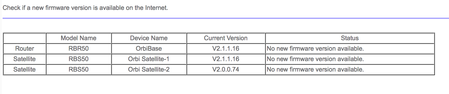
RBS 50 Satellite "stuck" on firmware 2.0.0.74
I have just added a second satelllite to my home network. As delivered it was on firmware v1. Via the admin panel I did a firmware update to v2, however I notice that whilst the router and first sate...
- Dec 28, 2017
You need to unzip the file and then load the RBS50-V2.1.1.16.img file.

mahughesnh
Dec 28, 2017Guide
When my router updated to the latest firmware, the satelite did not update. I did the update manually and it was fine. Not sure why it didn't update automatically, it always has with past updates. But it was not a big deal to do it manually. Just follow the instructions in the advanced screen of the router interface and it took about 5 minutes to complete and link up.
Dave61
Dec 28, 2017Aspirant
Thanks, manual update was a good idea, but I get an error: "This firmware file is incorrect! Please get the firmware file again and make sure it is the correct firmware for this product."
I downloaded the file and tried again, with the same result.
 DarrenMDec 28, 2017Sr. NETGEAR Moderator
Try to power cycle that satellite unit then try the update again.
DarrenM
- Dave61Dec 28, 2017Aspirant
Thanks, just tried that but still same error.
- mahughesnhDec 28, 2017Guide
Make sure you download the firmware for the RBS50, not the RBR50. Easy mistake to make.