NETGEAR is aware of a growing number of phone and online scams. To learn how to stay safe click here.
Forum Discussion

m4f1j0z0
Aug 02, 2018Aspirant
RBS50 shown under "Connected Devices", but not under "Connected Satellites"
I have Orbi RBK50 in AP Mode with ethernet backhaul. I ran through all possible suggestions from this forum on how to get the enternet backhaul working properly (posts like this one https://community...
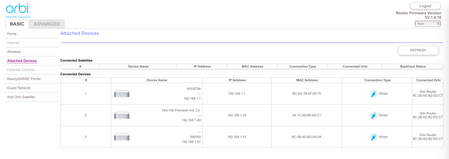
- Aug 02, 2018OK, problem solved. I just remembered that someone suggested not to connect the RBR50 to the router through the WAN port.
I just moved the cable to ETH1 port, restarted the RBR50 and RBS50, and voilà, the RBS50 shows normally under connected satellites.
Really this Netgear software / firmware is ridiculous. I might switch to Linksys Velop just out of principle.

FURRYe38
Aug 02, 2018Guru - Experienced User
Is the satellite working ok?
Is the satellite directly connected to the base or thru a switch?
- m4f1j0z0Aug 02, 2018AspirantThe satellite is working fine. It's connected to the ASUS Router, just like the RBR50.
- m4f1j0z0Aug 02, 2018AspirantOK, problem solved. I just remembered that someone suggested not to connect the RBR50 to the router through the WAN port.
I just moved the cable to ETH1 port, restarted the RBR50 and RBS50, and voilà, the RBS50 shows normally under connected satellites.
Really this Netgear software / firmware is ridiculous. I might switch to Linksys Velop just out of principle.