NETGEAR is aware of a growing number of phone and online scams. To learn how to stay safe click here.
Forum Discussion

stevefxp
Mar 22, 2019Apprentice
RBW30 - Update Failed
Hello all,
I recently updated my RBW30 to v2.3.0.4. I am noticing that its saying it has a firmware update but the update failed. Anyone seeing this?
Steve


FURRYe38
Mar 25, 2019Guru - Experienced User
Ok, I believe it's updated to the latest then.
I would factory reset it and setup from scratch...
GT0113 wrote:
I just tried from a Windows 7 machine using IE 11 and have the exact same behavior - Update failed. The RBW30's firmware is currently at V2.3.0.4.
adhodgson
Mar 25, 2019Aspirant
Hi,
I have the exact same issue. My RBR50 and RBS50s can update fine but the update is not going through due to RBW30. This is a recently factory reset unit after I upgraded to 2.3 firmware and I don't wish to do this again as I believe the issue is that it is failing to download the update file somewhere rather than a problem with the firmware itself. I have tried both from OSX and Windows (not that it would make a difference). One for Netgear to resolve I guess.
Andrew.
- FURRYe38Mar 25, 2019Guru - Experienced User
Are you trying to apply the FW update thru the Orbi or thru the RBWs web page?
What versions currently loaded on the RBW? Besure you factory reset and setup again to be sure the FW did update or didn't and try again from Windows. Try using IE11 or FF browsers.
adhodgson wrote:
Hi,
I have the exact same issue. My RBR50 and RBS50s can update fine but the update is not going through due to RBW30. This is a recently factory reset unit after I upgraded to 2.3 firmware and I don't wish to do this again as I believe the issue is that it is failing to download the update file somewhere rather than a problem with the firmware itself. I have tried both from OSX and Windows (not that it would make a difference). One for Netgear to resolve I guess.
Andrew.
- adhodgsonMar 26, 2019Aspirant
Hi,
When I woke this morning I got a notification on my phone that my Orbi had automatically updated. When I quickly checked before leaving for work the RBR50 and 2 RBS50s had upgraded to 2.3.1.44 but the RBW30 was still on 2.3.0.4 firmware. It all seems fine and not sure whether Netgear did anything at their end to pull the firmware metadata from the RBW30, I will check the upgrade status on the Orbi web page later this evening when I get home. To answer the question about whether I did this from the Orbi webpage or manual upgrade, as the upgrade files don't appear to be on the Netgear website I can only do this via the Orbi interface (I primarily use the web pages but have the app installed as well just for giggles).
Thanks.
Andrew. - FURRYe38Mar 26, 2019Guru - Experienced User
.4 is the latest for the RBW.
Let us know how it goes for you. You should be good.
I would do a backup of the configuration to file ON the RBR.
adhodgson wrote:
Hi,
When I woke this morning I got a notification on my phone that my Orbi had automatically updated. When I quickly checked before leaving for work the RBR50 and 2 RBS50s had upgraded to 2.3.1.44 but the RBW30 was still on 2.3.0.4 firmware. It all seems fine and not sure whether Netgear did anything at their end to pull the firmware metadata from the RBW30, I will check the upgrade status on the Orbi web page later this evening when I get home. To answer the question about whether I did this from the Orbi webpage or manual upgrade, as the upgrade files don't appear to be on the Netgear website I can only do this via the Orbi interface (I primarily use the web pages but have the app installed as well just for giggles).
Thanks.
Andrew. - grservidioMar 28, 2019Aspirant
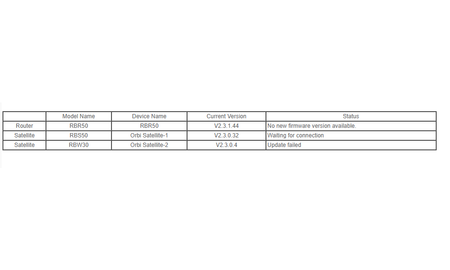
I noticed today when I checked for a firmware update, I now see the following:
- FURRYe38Mar 29, 2019Guru - Experienced User
Thats great. You have the latest FW for your devices.
Enjoy. :smileywink:
grservidio wrote:
I noticed today when I checked for a firmware update, I now see the following: