NETGEAR is aware of a growing number of phone and online scams. To learn how to stay safe click here.
Forum Discussion

rix0rrr
Feb 12, 2018Star
Drops network every 30 seconds for 5 seconds
My Orbi is dropping network connectivity for 5 seconds just about every 30 seconds. It's not exactly 30 seconds, but it does occur very regularly, definitely every minute. I'm on version 2.1.2.18...
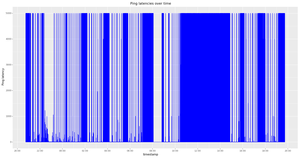
- Feb 17, 2018
Downgrading to V2.0.1.4 fixed it for me.
rix0rrr
Apr 08, 2018Star
And my Orbi rolled forward again to V2.1.3.4 and now it's broken again.
Going to roll back and disable updates.
NetGear, you're not very good at software!
PyroDog
Apr 08, 2018Apprentice
I've been through your exact same experience. No one from Netgear has been able to address this concern directly. My permanent solution has been to rollback all the way to V2.0.0.74 and use my main router's firewall to block the Orbi units from updating.
- FURRYe38Apr 08, 2018Guru - Experienced User
What is the problem your having? Please give details.
Hard to know whats really wrong.
PyroDog wrote:I've been through your exact same experience. No one from Netgear has been able to address this concern directly. My permanent solution has been to rollback all the way to V2.0.0.74 and use my main router's firewall to block the Orbi units from updating.
- PyroDogApr 08, 2018Apprentice
FURRYe38 wrote:What is the problem your having? Please give details.
Hard to know whats really wrong.
PyroDog wrote:I've been through your exact same experience. No one from Netgear has been able to address this concern directly. My permanent solution has been to rollback all the way to V2.0.0.74 and use my main router's firewall to block the Orbi units from updating.
https://community.netgear.com/t5/Orbi/Orbi-MR-2-1-Update-3-23-18/m-p/1533917/highlight/true#M26314
- rix0rrrApr 08, 2018Star
Well if the thing's going to auto-upgrade, I hope I don't need to manually reset settings afterwards. That's just bad design. How would I even know this happened or that I need to do things?
I've just completely lost faith in NetGear to do software upgrades properly. I have downgraded to a version that I know works (mentioned before in this thread), and I've manually disabled updates by telnetting in and disabling that feature. **bleep** this **bleep**, no piece of hardware costing multiple hundreds of euros should be costing me this much of my time.
- FURRYe38Apr 08, 2018Guru - Experienced User
The reason you have to factory reset and set up from scratch is that there are major changes in beta versions, These need to have a clear and good installation then set up form scratch to work well. When NG gets ready to do a full release, I was told that then users won't have to do a factor reset then set up from scratch. Upgrading with current configurations should work well and persist thru the upgrade. For now, betas need to be factory reset then setup from scratch. Others have said this has fixed there issues when using betas. Did for me as well.
Router:
CPU Load: 20.72%
Memory Usage(Used/Total): 159 MB/484 MB
System Uptime: 3 days 07:37:08
Satellite:
CPU Load 16.9903%
Memory Usage(Used/Total) 177MB/484MB
Flash Usage(Used/Total) 32MB/4GB
Network Session(Active/Total) 4333/65536
System Uptime 04 days 04:40:21
rix0rrr wrote:Well if the thing's going to auto-upgrade, I hope I don't need to manually reset settings afterwards. That's just bad design. How would I even know this happened or that I need to do things?
I've just completely lost faith in NetGear to do software upgrades properly. I have downgraded to a version that I know works (mentioned before in this thread), and I've manually disabled updates by telnetting in and disabling that feature. **bleep** this **bleep**, no piece of hardware costing multiple hundreds of euros should be costing me this much of my time.
- FURRYe38Apr 09, 2018Guru - Experienced User
https://community.netgear.com/t5/Orbi/Orbi-MR-2-1-Update-3-23-18/m-p/1547562/highlight/true#M27733
PyroDog wrote:
FURRYe38 wrote:What is the problem your having? Please give details.
Hard to know whats really wrong.
PyroDog wrote:I've been through your exact same experience. No one from Netgear has been able to address this concern directly. My permanent solution has been to rollback all the way to V2.0.0.74 and use my main router's firewall to block the Orbi units from updating.
https://community.netgear.com/t5/Orbi/Orbi-MR-2-1-Update-3-23-18/m-p/1533917/highlight/true#M26314
