NETGEAR is aware of a growing number of phone and online scams. To learn how to stay safe click here.
Forum Discussion

jeffbr26
Dec 15, 2018Follower
Orbi Blocking Websites - Solved
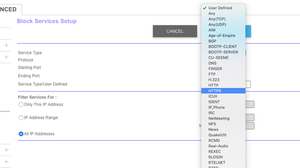
ORBI is blocking HTTPS websites that are not explicitly defined in URL.
To unblock any https website, do the following:
Log into to your router admin console (https://orbilogin.net)
Cli...
knmartin
Sep 05, 2019Initiate
ok, i'm going to try and answer this, as i was having the same problem - and the answers were just very confusing.
Background----
1. my network had a ATT ROUTER that the ATT guy put in place. Internet was up and running and was good, as long as i was close to the router. So I bought the Orbi - because the review and people at Best Buy said it was "just plug in and everything is good and will fill the whole house and outside"
2. It doesnt work that way - here is why (in my terms (im sure i will get this wrong)
3. The ATT ROUTER is sending out an IP address that allows your home to access the internet
4. As soon as you connect the ORBI - without doing anything else, it too will send out an IP address
5. this is fine, except that now the IP addresses have a conflict and wont let certain websites connect - i dont know the technical reason why - it just does.
6. so... HERE IS THE KEY... you have to turn off the ORBI system, from generating its own IP address, and use the one the ATT Router generates, and ONLY use the ORBI to expand the wireless network throughout the house. In order to do this you need to change the ORBI from "ROUTER MODE" to "ACCESS POINT" or AP mode... they dont make it easy to do this so i found this YOUTUBE VIDEO
7. https://www.youtube.com/watch?v=H7LOcJ8GdDo
8. i had to watch the video all the way through once so i knew what was going to happen, and then i watched, and then paused at each step and actually did the same thing.
9. It worked.
10. basically there will be a login to the ORBI device by typing "orbilogin.com" in a browser
--- the login is "admin" / "password" meaning that is the code... user name = "admin" and password = "password"
--- follow the video, pause every step and do exactly what it says - and it will work.
11. they really should have a external button that does this and you choose from the very beginning before plugging into your providers Router.
hope this helps - in my plain english...
Hakur
Jul 17, 2020Aspirant
Thank you!! I just got a new Orbi and was having the website Password and Login issue and this description solved the problem!!