NETGEAR is aware of a growing number of phone and online scams. To learn how to stay safe click here.
Forum Discussion

Vendo232
Jan 20, 2021Aspirant
RKB50: Trouble connecting all my devices ( ~90 ) to the router.
Help needed: I have ~90 devices in my home setup ( 1x RBR50 + 1xRBS50 ) . it has been working well for most part bu ever since 2.7.X release I started having issues to connect to the router after reb...

FURRYe38
Jan 20, 2021Guru - Experienced User
Has a factory reset and setup from scratch been performed since last FW update?
90 devices is alot for 1 RBR and 1 RBS to handle. Might add a RBS to help spread out the devices being connected.
What is the Mfr and model# of the Internet Service Providers modem/ONT the NG router is connected too?
I
What is the size of your home? Sq Ft?
What is the distance between the router and satellite(s)? 30 feet or more is recommended in between RBR and RBS to begin with depending upon building materials when wirelessly connected.
https://kb.netgear.com/31029/Where-should-I-place-my-Orbi-satellite
What channels are you using? Auto? Try setting manual channel 1, 6 or 11 on 2.4Ghz and any unused channel on 5Ghz.
Any Wifi Neighbors near by? If so, how many?
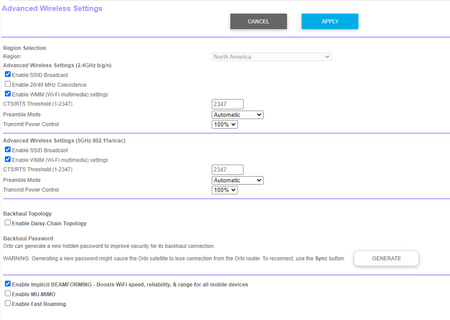
Try enabling Beamforming and MIMO(MIMO may or may not be needed) and WMM. Under Advanced Tab/Advanced Settings/Wireless Settings
Try disabling the following and see:
Armor, Circle, Daisy Chain, Fast Roaming, IPv6 and Set 20/40Mhz Coexistence to 40Mhz only. Set Short preamble instead of Long preamble modes. Save settings and reboot the router and satellite(s).
One User Experience/Configuration:
https://community.netgear.com/t5/Orbi/Most-Stable-Orbi-Configuration/m-p/1941087/highlight/true#M97026
- Vendo232Jan 20, 2021Aspirant
Thank you Furry for your suggestions at the end of your reponse see my comments below
FURRYe38 wrote:Has a factory reset and setup from scratch been performed since last FW update? [vendo232] Yes, I moved from 2.7.2 to latest Voxel yesterday hoping it will fix my situation but it did not.
90 devices is alot for 1 RBR and 1 RBS to handle. Might add a RBS to help spread out the devices being connected.
What is the Mfr and model# of the Internet Service Providers modem/ONT the NG router is connected too?
[vendo232] MB7220 motorola 8x4 DOCSIS 3.0 Cable Modem ( Comcast )( now when I`m thinking about it , this element has recently changed. Did not know if could impact AP connections.What is the size of your home? Sq Ft? [vendo232] ~3000sq , we have 2 floors. I keep main RBK in the basement inn the middle of the house and satelite is in garage on a first floor. based on roomba wifi mapping I`m covered well w/o weak spots.
What is the distance between the router and satellite(s)? 30 feet or more is recommended in between RBR and RBS to begin with depending upon building materials when wirelessly connected. [vendo232] satelite is connected using LAN cable CAT6.
https://kb.netgear.com/31029/Where-should-I-place-my-Orbi-satelliteWhat channels are you using? Auto? Try setting manual channel 1, 6 or 11 on 2.4Ghz and any unused channel on 5Ghz.
Any Wifi Neighbors near by? If so, how many?[vendo232] tried AUTO, tried 11,6,1 w/o major difference. and neighbours I have but that element has not changed.
Try enabling Beamforming and MIMO(MIMO may or may not be needed) and WMM. Under Advanced Tab/Advanced Settings/Wireless Settings
[vendo232] this is good advice, I have not tried short preamble but you will have to help me where to set only 40Mhz coexistence. I see only check box for "Enable 20/40 MHz Coexistence"
Try disabling the following and see:
Armor, Circle, Daisy Chain, Fast Roaming, IPv6 and Set 20/40Mhz Coexistence to 40Mhz only. Set Short preamble instead of Long preamble modes. Save settings and reboot the router and satellite(s).One User Experience/Configuration:
https://community.netgear.com/t5/Orbi/Most-Stable-Orbi-Configuration/m-p/1941087/highlight/true#M97026- FURRYe38Jan 20, 2021Guru - Experienced User
Vendo232 wrote:Thank you Furry for your suggestions at the end of your reponse see my comments below
Has a factory reset and setup from scratch been performed since last FW update? [vendo232] Yes, I moved from 2.7.2 to latest Voxel yesterday hoping it will fix my situation but it did not.
90 devices is alot for 1 RBR and 1 RBS to handle. Might add a RBS to help spread out the devices being connected.
What is the Mfr and model# of the Internet Service Providers modem/ONT the NG router is connected too?
[vendo232] MB7220 motorola 8x4 DOCSIS 3.0 Cable Modem ( Comcast )( now when I`m thinking about it , this element has recently changed. Did not know if could impact AP connections.What is the size of your home? Sq Ft? [vendo232] ~3000sq , we have 2 floors. I keep main RBK in the basement inn the middle of the house and satelite is in garage on a first floor. based on roomba wifi mapping I`m covered well w/o weak spots.
Basements are not recommended places for wifi routers. Foundation concrete and steel will impact wifi travel and coverage. Main or upper floor is best for placement and coverage.
What is the distance between the router and satellite(s)? 30 feet or more is recommended in between RBR and RBS to begin with depending upon building materials when wirelessly connected. [vendo232] satelite is connected using LAN cable CAT6.
https://kb.netgear.com/31029/Where-should-I-place-my-Orbi-satelliteWhat channels are you using? Auto? Try setting manual channel 1, 6 or 11 on 2.4Ghz and any unused channel on 5Ghz.
Any Wifi Neighbors near by? If so, how many?[vendo232] tried AUTO, tried 11,6,1 w/o major difference. and neighbours I have but that element has not changed.
Try enabling Beamforming and MIMO(MIMO may or may not be needed) and WMM. Under Advanced Tab/Advanced Settings/Wireless Settings
[vendo232] this is good advice, I have not tried short preamble but you will have to help me where to set only 40Mhz coexistence. I see only check box for "Enable 20/40 MHz Coexistence"
Just uncheck the check box and this will set 40Mhz only.
Try disabling the following and see:
Armor, Circle, Daisy Chain, Fast Roaming, IPv6 and Set 20/40Mhz Coexistence to 40Mhz only. Set Short preamble instead of Long preamble modes. Save settings and reboot the router and satellite(s).One User Experience/Configuration:
https://community.netgear.com/t5/Orbi/Most-Stable-Orbi-Configuration/m-p/1941087/highlight/true#M97026- Vendo232Jan 20, 2021Aspirant
Now I know for sure that enabeling " Enable 20/40 MHz Coexistence " will make my phone not to connect ( pixel 3 XL ).
Regarding moving my router from basement. I was thinking about it but the problem I have is that I use RBR as DHCP server and as such I must return back to basement where my switch unmanaged is for CAT6 cable around my house.
One solution would be to buy DHCP switch and place it behind Cable modem
Motorola DOCSIS -> DHCP server box ? -> Netgear unmanaged 24put switch -> RBR50 in AP mode -> RKS in AP mode.
then I would be able to place RBR50 some other place in the house where my CAT6 cable is located.
what do you think I can use as DHCP server? I was thinking about Ubuquiti USG?