NETGEAR is aware of a growing number of phone and online scams. To learn how to stay safe click here.
Forum Discussion

thedigester
Jan 20, 2025Aspirant
Roon cannot see endpoint as audio zone on Orbi RBK50 satellite
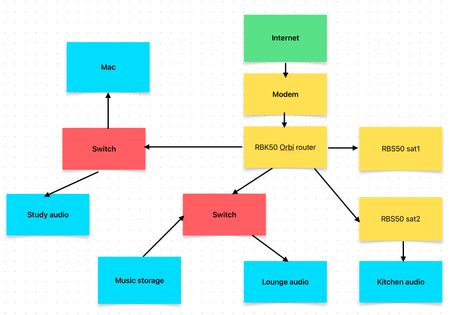
I use Roon to play music. It is an online digital media player that plays music stored on a network through audio zones ("endpoints") on the network. Problem - the kitchen audio endpoint appe...
thedigester
Jan 28, 2025Aspirant
The TP-link extender solved the problem. Sometimes the simplest solutions are the best.
Thank you so much for your help.
Thank you so much for your help.

CrimpOn
Jan 28, 2025Guru - Experienced User
What a relief!
Even simple "unmanaged" Ethernet switches have a ton of software embedded into the hardware. Things like:
- Autonegotiation. Where the devices at each end of the cable decide what speeds they both can handle and settle on one. https://en.wikipedia.org/wiki/Autonegotiation
- Auto MDI/MDI-X which accepts straight through or 'crossover' cables automatically. https://en.wikipedia.org/wiki/Medium-dependent_interface
- Green capability, to reduce power in specific circumstances. https://en.wikipedia.org/wiki/Energy-Efficient_Ethernet
- IGMP Snooping. To prevent networks from being flooded with IGMP broadcasts that no device wants to see.
https://en.wikipedia.org/wiki/IGMP_snooping
Users have no control over this level of hardware. For years the Forum dealt with situations where Orbi satellites would not function correctly because users had installed switches with poorly designed IGMP Snooping or Green features.
What this solution appears to indicate is that the Ethernet switch module soldered onto the satellite motherboard was blocking some of the IGMP broadcasts from the MS200. Bypass that one piece of hardware, and "all good".
- thedigesterJan 28, 2025Aspirant
CrimpOn I'm afraid I spoke too soon... the MS200 has disappeared again. The only change I made was to update the TP-link firmware. Perhaps that was a mistake.
I cannot see the MS200 on the network, but it is shown via the TP-link app as being hardwire connected.
Here is another Wireshark capture - hopefully that gives you a clue as to what's going on:
- CrimpOnJan 28, 2025Guru - Experienced User
One "feature" of some WiFi Extenders is to manipulate the MAC address of devices connected to the Extender.
I ran into this four years ago when I installed a WiFi Extender in the garage to replace a Powerline adapter that was failing. All of the devices that I had carefully assigned IP addresses to in the LAN Setup page got different addresses. What??? When I looked more closely, it seemed like they no longer had the MAC address that I had entered into the LAN Setup table. (My memory of 2020 is a bit dim.)
Would it be possible to compare the MAC address and IP address of the MS200
- When it is connected to the Orbi satellite
- When it is connected to the TP-Link RE220
I will dig out my RE220 and perform a similar experiment.
- CrimpOnJan 28, 2025Guru - Experienced User
Looks like I jumped before looking.
This capture shows exactly the same pattern as before. MS200 sends out** a lot of IGMPv2 broadcasts, but none of the UDP broadcasts that the other speakers do.
Ethernet MAC address of 00:24:C5:00:0E:84 and IP of 172.16.0.12 are the same on both captures.
Darn.
Actually, we do not know what the MS200 is broadcasting, only what the iMac is receiving. Capturing Ethernet is a tricky business because of how Ethernet switches function..
- Switches "learn" the route to every device on the network by creating address tables. "To get to this MAC address, send packets out this port." They have no idea whether that port leads directly to the device, or to another part of the network that (eventually) reaches the physical device.
- Broadcast packets are sent out every network port.
When Wireshark puts an Ethernet adapter into promiscuous mode, the adapter captures every pack that comes in:
- Unicast packets that are addressed to it, plus
- Multicast packets that are going everywhere.
- Unicast packets that are destined for some other MAC address cannot be captured because they do not get sent to this adapter.
All we know is that we are not seeing those UDP broadcasts. My guess is that the MS200 is sending them out, because it works fine when connected to one of the Electric 8 switches.
- thedigesterFeb 16, 2025Aspirant
Just to close this one off, I ended up buying a new streamer (iFi Zen Stream FWIW) to replace the Meridian MS200 and it is working fine on Roon via the Orbi satellite + Ethernet.
Many thanks to CrimpOn for all their help.
- CrimpOnFeb 16, 2025Guru - Experienced User
Smart move!
I realize there is no major benefit to struggling any more with the MS200 (it is really from 2013?) I was researching a similar issue in 2023 and picked up a pair of cheap stereo speakers on Amazon for $15USD. With a 3.5mm jack, they are intended for connection to a PC, but should also work with the MS200.
It might be interesting to verify where the MS200:
- works consistently. never fails.
- works inconsistently. sometimes, but not all the time.
- never works.