NETGEAR is aware of a growing number of phone and online scams. To learn how to stay safe click here.
Forum Discussion

Chuck_M
Jan 12, 2019Mentor
Same Model System, Different Behavior??
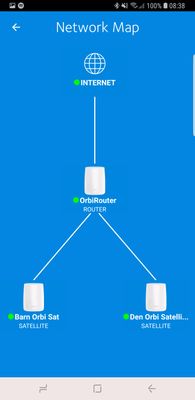
I had recently posted on here that although my Orbi system was running well, the Orbi app would not list devices under the "Network Map" option. I have tried all sorts of things to get this to work ...
- Jan 14, 2019
SOLVED ISSUE Of Network Map Not Rendering Properly and Showing Devices By Connection On Android!!!!!!!
BLUF: My original local SSID was "Daily Planet" The Space in the SSID was preventing the "CONNECTION TYPE" and "CONNECTED ORBI" fields from being reported to the Orbi App! (My neighbors SSID is only 4 characters long with no spaces so theirs worked properly)
This only affected Android devices running the Orbi App... Not Apple Devices
Process I took per FURRYe38 recommendation:
- Disconnected satellites (2 of them)
- Hard reset Router
- Rebooted & initial set up
- Tested (It didnt work since I used my original SSID "Daily Planet")
- Reverted to an Earlier Firmware version thinking that may help -- rebooted and set up but used the default SSID (ORBI38)
- Noticed all was working properly!
- Changed SSID to "Daily Planet"
- Noticed it DIDNT WORK again with an SSID with a space in it
- Changed SSID to "Daily_Planet"
- Noticed it was working properly!
- Updated Firmware to current version
- Verified it is still working properly on all android devices.
- Turned back on Satellites
- Updated Settings for Reserved IPs etc and reattached wireless devices with new SSID
- Poured myself a cocktail and am a happy man!
Orbi and the Orbi APP CANNOT HANDLE SSID's with spaces in them. They will not render the network map properly if so.
To resolve: Take out the spaces -- replace with underline and it should work properly!!!!!!
A couple of heroes out there who deserve recognition for helping & discussing this
Pass the word. If you have spaces in your SSID, Android phones will not render the Attached devices properly under the DEVICE LIST nor the NETWORK MAP!
Chances are, someone ought to report this to the Orbi App Folks and this solution should be pinned at top for reference


ekhalil
Jan 13, 2019Master
Chuck_M wrote:
......
I also uninstalled, rebooted phone and reinstalled the app. No change in behavior.
.....
When you reinstalled the app, have you retained the device names and icons that you set before? There should be a way in Android devices to flush/delete app data after uninstalling it, so that the app will not reuse the same old data. Can you please try that.
Chuck_M wrote:
..........
One other behavior (that has been around all along) is inability to log on remotely. Here is screen capture of phone app when trying to do so:
........
Regarding Remote Management, you have to activate this in the GUI settings AND in the app as follows:
In the GUI as here:
And in the app as follows:

JoeCymru
Jan 13, 2019Virtuoso
Just for the record people, yesterday my app map populated. I changed nothing. It just showed up. "A miracle!" I shouted, consequently scaring the cat. Surely high ranking Netgear executives were reading the community threads and rushing to fix anomalies in their products.
Today the map shows "no devices connected" to router or either satellite, nor will they populate over time or persistance.
Yes, I have remote management on. No, I have no Sonos devices.Yes, all devices show up on the device list on the app, just not the app map. Yes, they populate on the Genie app. No, I am having no other issues with the Orbi system currently. None of this would be an issue except they are removing Orbi support from Genie, and we - at least some of us - are left with an app / Orbi communication issue where we cannot determine what device is connected to what on the app unless we use the desktop view of the web interface on mobileor use the web interface on laptops
Interesting also is that changing the filters on the device list works only sporatically.
- ekhalilJan 13, 2019Master
JoeCymru wrote:
........., and we - at least some of us - are left with an app / Orbi communication issue where we cannot determine what device is connected to what on the app ......
:D
So in your "Device List" in the pp you can't see if the device is connected to the router or any of the satellites? So the following information is missing for you? Chuck_M confirmed that this information is available in his app?
Do you also use an Android device? Can this be an Android app issue?
- Chuck_MJan 13, 2019Mentor
ekhalil wrote:
JoeCymru wrote:
........., and we - at least some of us - are left with an app / Orbi communication issue where we cannot determine what device is connected to what on the app ......
:D
So in your "Device List" in the pp you can't see if the device is connected to the router or any of the satellites? So the following information is missing for you? Chuck_M confirmed that this information is available in his app?
Do you also use an Android device? Can this be an Android app issue?
@@ekhal;
- I have indeed cleared all app data before reinstall. No change.
- My app does NOT show the Orbi device that wireless devices are connecting through. Note below in the DEVICE LISTING screen the data for DEVICE TYPE and CONNECTED ORBI are both missing!!!
- I went over to my friends home JUST NOW -- my same phone, my same app works perfectly with all his devices showing up and the CONNECTED ORBI and DEVICE TYPE label showing up properly in the device list.
- I believe the CONNECTED ORBI and DEVICE TYPE missing labels are an important clue on those who are missing network map data. I will bet that if your tree doesnt render, you will not see CONNECTED ORBI or DEVICE TYPE in the the app -- Can someone (@JoeCymru) else with this issue check for this?
- I belive this indicates the APP is working just fine and the problem is local to the internals of the ORBI -- somewhere in its configuration. Why else would one work and literally 1 minute later the other wouldnt?
Here is my screen cap JUST NOW from the and notice the DEVICE TYPE and CONNECTED ORBI labels are missing from the DEVICE LIST menu item
Now check this out... less than two minutes later I go to my neighbors house and log onto his wireless, run the orbi app.
His Orbi system shows the labels for CONNECTED ORBI and DEVICE TYPE
When I return home, the same app, the same phone, does not show the CONNECTED ORBI and DEVICE TYPE on my network.
ONE OTHER CLUE: When selecting the DEVICE LIST option on my network, it takes CONSIDERABLE TIME TO POPULATE as it reports that it is retrieving data -- my neighbors install seems almost instantaneous,
The following screens are my friend's install that I opened discussed above. Note he has Sonos too :)
His
- ekhalilJan 13, 2019Master
I agree that this must be something with the comminication between Orbi and the app.
Orbi should send to the app the MAC addresses af the devices and where they are connected. The app will use this information to allocate the devices to the different parts of the map. Since the information about where the devices are connected is missing the app is not able to do it's work.
I would like to try the following:
1. Please change the names of the Router and Satellite and use simple names: RBR50 and Satellite-1, Satellite-2 and see if that was something that the app did not understand!
2. I see that you have iPhones/iPads in your network, have you tried to use the Orbi app from there and see if there is any difference.
Let's see if we will get this -somehow- solved
- Chuck_MJan 13, 2019Mentor
Names changed to RBR50, RBS50_1 and RBS50_2.
- Result: No apparent change.
- The Device List still doesn't show fields for DEVICE TYPE nor does it show fields for CONNECTED ORBI
- The network map continues to report "No Connected Device Found"
On a side note: can you please take a screen capture and post the ADVANCED | SETUP | QOS screen from the web GUI? The only thing that appears in mine is a TEST SPEED entry. is that right? Doesnt seem to me like that should be the only thing in there.
- Result: No apparent change.
- Chuck_MJan 13, 2019Mentor
Using an IPAD on my network, all behaviours are as they should be and all functionality is there!!!
Using the network map on the IPAD populates properly with connected devices, and the DEVICE LIST shows Connected Orbis as well as Device type.
- Chuck_MJan 13, 2019Mentor
So how do we determine where this communication issue is? On android Orbi app, works at neighbors, doesnt work here. On Apple device, works here.
Here is another interesing datapoint I just found: If you bring up (on Android), Device List... they are missing DEVICE TYPE and CONNECTED ORBI fields. If you click EDIT ITEM... it will ask you for the DEVICE TYPE. If you put it in, it will stay there until you refresh the device list, but will still not populate the network map. Once you refresh, the DEVICE TYPE for that device you edited will disappear again.
It seems to me that the critical field in this case that is having commo issues is the CONNECTED ORBI field -- which of course would drive the network map display -- although device type is also problematic.
- JoeCymruJan 13, 2019Virtuoso
Same here Chuck. Also there are no refresh controls. Also when totally clearing the cache and data in the app and starting over, I suddenly get the connected device lists in the map. Then, like magic, they eventually disappear by themselves, if you leave the page and then return a couple of times. I also caught them loading when logging in after a log out. When they were loading on the actual device list (showing 13 at the time and knowing I had 28 devices attached) I quickly went to the map and the router icon, and they were there under attached devices (the ones connected to the router). Then to each satellite and the respective connections were there. Then back to the router and they were gone. Same with both satellites, they were gone. Same thing happens with my Samsung tablet as Samsung phone, with a different OS version..
One other thing I am curious about: how did you get into your neighbor's system with your app? The apps are initially connected through your Netgear account, that associates it for remote management. Sign in of course is with the password for the SSID, but can anyone with an Orbi app knowing someone's system password, get in and screw with their stuff?
- Chuck_MJan 13, 2019Mentor
Good question: I am the neighborhood computer geek.... and I was the guy who recommended my neighbor replace his unsupported Luma with Orbi. So I installed it for him. Since we are very good friends, I have access to his network and devices. I also asked him to come over today with his cell phone and log onto my wireless network to check functionality on mine. Bottom line, with the app, you just have to join the local wireless network and then know the owners PW since the app user name is admin.
Am going to take FURRYe38's advice with the hope that it will shed some light on why so many are doing this. Will report back shortly.
JoeCymru Joe, did you try logging in with an apple device? (Ipad, Iphone etc). That would be an excellent datapoint to know if that works on your network map.
And for all: Can you tell me what in the Web GUI is found under ADVANCED | QOS? All I have in mine is speedtest... which really isnt QOS.
Thanks... Here we go....
- FURRYe38Jan 13, 2019Guru - Experienced User
QoS is mostly automatic. NG chooses not to give any configurations here for unknown reasons. I believe there letting the QoS engine do it automatically. So for the most part, you only see the speedtest.net app located here and you can do a speed test or manually input your ISP speeds UP and down. Everything else is automatic.
Chuck_M wrote:
Good question: I am the neighborhood computer geek.... and I was the guy who recommended my neighbor replace his unsupported Luma with Orbi. So I installed it for him. Since we are very good friends, I have access to his network and devices. I also asked him to come over today with his cell phone and log onto my wireless network to check functionality on mine. Bottom line, with the app, you just have to join the local wireless network and then know the owners PW since the app user name is admin.
Am going to take FURRYe38's advice with the hope that it will shed some light on why so many are doing this. Will report back shortly.
JoeCymru Joe, did you try logging in with an apple device? (Ipad, Iphone etc). That would be an excellent datapoint to know if that works on your network map.
And for all: Can you tell me what in the Web GUI is found under ADVANCED | QOS? All I have in mine is speedtest... which really isnt QOS.
Thanks... Here we go....
- Chuck_MJan 14, 2019Mentor
SOLVED ISSUE Of Network Map Not Rendering Properly and Showing Devices By Connection On Android!!!!!!!
BLUF: My original local SSID was "Daily Planet" The Space in the SSID was preventing the "CONNECTION TYPE" and "CONNECTED ORBI" fields from being reported to the Orbi App! (My neighbors SSID is only 4 characters long with no spaces so theirs worked properly)
This only affected Android devices running the Orbi App... Not Apple Devices
Process I took per FURRYe38 recommendation:
- Disconnected satellites (2 of them)
- Hard reset Router
- Rebooted & initial set up
- Tested (It didnt work since I used my original SSID "Daily Planet")
- Reverted to an Earlier Firmware version thinking that may help -- rebooted and set up but used the default SSID (ORBI38)
- Noticed all was working properly!
- Changed SSID to "Daily Planet"
- Noticed it DIDNT WORK again with an SSID with a space in it
- Changed SSID to "Daily_Planet"
- Noticed it was working properly!
- Updated Firmware to current version
- Verified it is still working properly on all android devices.
- Turned back on Satellites
- Updated Settings for Reserved IPs etc and reattached wireless devices with new SSID
- Poured myself a cocktail and am a happy man!
Orbi and the Orbi APP CANNOT HANDLE SSID's with spaces in them. They will not render the network map properly if so.
To resolve: Take out the spaces -- replace with underline and it should work properly!!!!!!
A couple of heroes out there who deserve recognition for helping & discussing this
Pass the word. If you have spaces in your SSID, Android phones will not render the Attached devices properly under the DEVICE LIST nor the NETWORK MAP!
Chances are, someone ought to report this to the Orbi App Folks and this solution should be pinned at top for reference
- FURRYe38Jan 14, 2019Guru - Experienced User
Kewl, great find. Something that NG should look into with this space in between the SSID names. Shouldn't matter.
Glad it's working now. Mark your post solved so others will know.
- ekhalilJan 14, 2019Master
- Well done Chuck_M, this is an excellent finding.
- Have you also tested the remote management configuration above?
- Regarding QoS, I see that Orbi has some defined priorities, which makes me think that NG will add configuration possibilities soon:
qos_list1=IP_Phone 0 IP_Phone 0 TCP 6670 6670 ---- ----
qos_list2=IP_Phone 0 IP_Phone 0 UDP 6670 6670 ---- ----
qos_list3=Skype 0 Skype 0 TCP 80,443 80,443 ---- ----
qos_list4=0
qos_list5=Netgear_EVA 0 Netgear_EVA 0 UDP 49152 49155 ---- ----
qos_list6=0
qos_list7=Vonage_IP_Phone 0 Vonage_IP_Phone 0 UDP 53,69,5060 53,69,5061 ---- ----
qos_list8=0
qos_list9=Google_Talk 0 Google_Talk 0 TCP 443 443 ---- ----
qos_list10=0
qos_list11=MSN_messenger 0 MSN_messenger 1 TCP 1863,1503,6891,6901 1863,1503,6900,6901 ---- ----
qos_list12=MSN_messenger 0 MSN_messenger 1 UDP 1503,2001,6801,6901 1503,2120,6801,6901 ---- ----
qos_list13=Yahoo_messenger 0 Yahoo_messenger 1 TCP 5050,5000,5100 5050,5010,5100 ---- ----
qos_list14=Yahoo_messenger 0 Yahoo_messenger 1 UDP 5000,5100 5010,5100 ---- ----
qos_list15=Netmeeting 0 Netmeeting 1 TCP 389,522,1503,1720,1731 389,522,1503,1720,1731 ---- ----
qos_list16=0
qos_list17=AIM 0 AIM 1 TCP 5190 5190 ---- ----
qos_list18=AIM 0 AIM 1 UDP 5190 5190 ---- ----
qos_list19=SlingStream 0 SlingStream 1 UDP 554 554 ---- ----
qos_list20=0
qos_list21=SSH 0 SSH 1 TCP 22 22 ---- ----
qos_list22=0
qos_list23=Telnet 0 Telnet 1 TCP 23 23 ---- ----
qos_list24=0
qos_list25=VPN 0 VPN 1 UDP 1701 1701 ---- ----
qos_list26=0
qos_list27=On_line_Game 0 On_line_Game 1 TCP 0 0 ---- ----
qos_list28=On_line_Game 0 On_line_Game 1 UDP 0 0 ---- ----
qos_list29=FTP 0 FTP 2 TCP 20,21 20,21 ---- ----
qos_list30=0
qos_list31=SMTP 0 SMTP 2 TCP 25 25 ---- ----
qos_list32=0
qos_list33=PPlive 0 PPlive 2 UDP 7100,7101,8000 7100,7101,8000 ---- ----
qos_list34=0
qos_list35=WWW 0 WWW 2 TCP 80 80 ---- ----
qos_list36=0
qos_list37=DNS 0 DNS 2 UDP 53 53 ---- ----
qos_list38=0
qos_list39=ICMP 0 ICMP 2 TCP 0 0 ---- ----
qos_list40=ICMP 0 ICMP 2 UDP 0 0 ---- ----
qos_list41=eMule 0 eMule 3 TCP 4242 4242 ---- ----
qos_list42=0
qos_list43=Kazaa 0 Kazaa 3 TCP 1214 1214 ---- ----
qos_list44=0
qos_list45=Gnutella 0 Gnutella 3 TCP 80,6346,6347 80,6346,6347 ---- ----
qos_list46=Gnutella 0 Gnutella 3 UDP 3646,6347 3646,6347 ---- ----
qos_list47=bt_azureus 0 bt_azureus 3 TCP 6881 6881 ---- ----
qos_list48=0
qos_list49=Counter-Strike 1 Counter-Strike 1 UDP 27015 27019 ---- ----
qos_list50=0
qos_list51=Age-of-Empires 1 Age-of-Empires 1 TCP 23978 23978 ---- ----
qos_list52=Age-of-Empires 1 Age-of-Empires 1 UDP 23978 23978 ---- ----
qos_list53=Everquest 1 Everquest 1 TCP 7000 7000 ---- ----
qos_list54=0
qos_list55=Quake-2 1 Quake-2 1 TCP 27960 27960 ---- ----
qos_list56=Quake-2 1 Quake-2 1 UDP 27960 27960 ---- ----
qos_list57=Quake-3 1 Quake-3 1 TCP 27960 27960 ---- ----
qos_list58=Quake-3 1 Quake-3 1 UDP 27960 27960 ---- ----
qos_list59=Unreal-Tourment 1 Unreal-Tourment 1 TCP 7777,27960 7783,27960 ---- ----
qos_list60=Unreal-Tourment 1 Unreal-Tourment 1 UDP 7777,27960 7783,27960 ---- ----
qos_list61=Warcraft 1 Warcraft 1 TCP 6112 6112 ---- ----
qos_list62=0

