NETGEAR is aware of a growing number of phone and online scams. To learn how to stay safe click here.
Forum Discussion

sdunnin68
Sep 23, 2016Aspirant
Satellite Connection Status
Is there a way to determine what the connection status is between router and satellite? Devices are showing as attached to the Satellite on the Attached Devices page. Not really sure if I can tell if...

th3w01f
Sep 24, 2016Apprentice
If you watch the satellite for about a minute after reconnecting you should see the final color. It's kind of a pain and I don't know how accurate it is. Mine was blue, when I finally caught it.
After that you can go under Advanced -> Advanced Home -> Internet Port -> Show Statistics. At the bottom you'll see Internet Backhaul. Mine shows 1733 and moving it a bit hasn't changed it so again, I'm not sure how accurate it is. The Rx and TX Bytes don't look correct for any of my radios. After 20 hours I’m showing 7 total for b/g/b, 159 total for a/n/ac and 124 million for backhaul.
;-)
 loomis1975Sep 24, 2016Luminary
The 1733 for the backhaul appears to be a "label" and not a moving statistic, just like the 400 and 866 above it for the 2.4 and 5 ghz.
- sdunnin68Sep 24, 2016Aspirant
I definately see Tx and Rx counts incrementing for the Backhaul so that must mean they are working. Connections with Satellite are strong and have good speed. Router still pulsing magenta so I don't know what that means though.
- th3w01fSep 24, 2016Apprentice
@loomis1975, I think you're 100% correct that those are just labels, so there doesn't appear to be a way to see the quality of the backhaul connection. Support said there was so hopefully I'm just missing it or it's coming in a new FW.
@sdunnin68, I can't find anything on that status either, and I never saw that behavior.
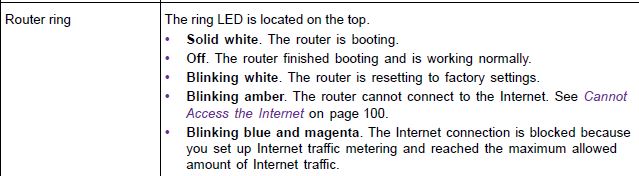
From the main manual - Orbi Full Manual
- loomis1975Sep 24, 2016Luminary
So, router is continually pulsing just magenta color, but you have a valid IP address from modem/isp, Internet Status says "Good" on the router's home page, and you have access to the internet?
That is definitely not what the LED rings are suppose to do. If everything is normal, lights are OFF on both router and satellite.
Might want to open a support ticket.
From Netgear KB article:
what-do-the-leds-on-my-orbi-mean
Pulsing magenta. Your Orbi router ring LED might pulse magenta for the following reasons: the WAN port link is down, the router is unable to get the IP address from the modem or ISP, or the router is unable to connect to the Internet.
- sdunnin68Sep 24, 2016Aspirant
Yes, internet status is good and wireless devices have access to internet. Router is in AP mode and has a static address assigned to it. That's a little different from the average configuration but certainly not out of the ordinary.