NETGEAR is aware of a growing number of phone and online scams. To learn how to stay safe click here.
Forum Discussion

Jeffgear
Aug 21, 2024Virtuoso
Satellite IP addresses
I noticed in the device table in the web UI that the IP addresses that have been automatically assigned to my three RBS50 satellites connected via WiFi bak haul are all 192.168.1.250 which seems odd ...
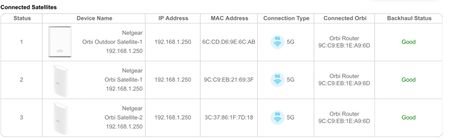

Jeffgear
Sep 16, 2024Virtuoso
Yes the RBS behaved fine after assigning them statics. Ultimately though I replaced the whole system with the 860 and two satellites, I note that the sats are dynamically assigned IPs.
Now for some new fun and games with the 860 ecosystem… 🙂 have found a couple of different bugs to the 850.
Now for some new fun and games with the 860 ecosystem… 🙂 have found a couple of different bugs to the 850.

CrimpOn
Sep 16, 2024Guru - Experienced User
Jeffgear wrote:
I replaced the whole system with the 860 and two satellites, I note that the sats are dynamically assigned IPs.
Every device connected to any Orbi system that uses DHCP to request an IP address will get one from the DHCP pool unless the LAN Setup page has been used to assign a specific IP address to the device. That includes Orbi satellites.
The recommended practice is to use a part of the address space from x.2 through x.254 for the DHCP 'pool' and to put assigned IP addresses in the remaining part. For example, setting aside 2-100 to be used as assignments and then defining the 'pool' to be 101 through 200.
- JeffgearSep 16, 2024VirtuosoI’ve possibly created a poor non contiguous address pool by assigning whatever IP was shown as a static to all smart devices but have left phones and laptops as dynamic. Perhaps I should reassign from a designated range .200 upwards?
- CrimpOnSep 16, 2024Guru - Experienced User
Yes, assigned IPs should not be within the 'pool'.
- FURRYe38Sep 17, 2024Guru - Experienced User
IP address reservations should be with in the default DHCP IP address pool range, STATIC IP addresses which are set ON devices and not the router, should be OUTSIDE of the default DHCP IP address pool range. I prefer to use .100 to .200 on my systems. Then anything out side of this range can be used for Static IP addressed devices.
Jeffgear wrote:
I’ve possibly created a poor non contiguous address pool by assigning whatever IP was shown as a static to all smart devices but have left phones and laptops as dynamic. Perhaps I should reassign from a designated range .200 upwards? - JeffgearSep 17, 2024Virtuoso
My bad for mis-using terminology here, sorry.
When I say "static" I meant Reservations and they are from the pool, so assigned a consistent IP to a device that still DHCPs.
I have not actually hard set any static IPs on the end devices themselves. That could be a nightmare to manage.
- FURRYe38Sep 19, 2024Guru - Experienced User
Easy devices to set statics for are Printers, controllers and cameras and NAS. What I use here for my devices. I don't have to manage much after that and devices are always accessible at those static IP addresses.
