NETGEAR is aware of a growing number of phone and online scams. To learn how to stay safe click here.
Forum Discussion

donawalt
Feb 12, 2022Hero - Experienced User
Setting up wired backhaul
HI all, I am taking another stab at getting the RBR/RBSS850 set up in an old big house with lost of thick walls etc.! This time, I have been getting all the rooms wired with Ethernet, done! My curre...
- Feb 25, 2022
donawalt wrote:
Hi, as promised I am checking back with results! Everything worked fine, the network is running great! We have a rowhouse, about 4500 square feet with 3 floors and a basement. We have Comcast 1.2/40 service. I have an RBR850 in the basement where the cable comes in (somewhat in the center, thanks to a long cable), an RBS850 in the dining room on the first floor roughly 1/3 of the way in from the back of the house, nothing on the second floor, and another RBS850 on the third floor roughly 1/3 the way in frm the front of the house! All are well more than 30' from each other. I was very careful studying signal strength as I added the devices one at a time, as a result I only need two satellites, and the speed test results are great everywhere! The router handles the basement and 1st fl. living room at the front of the house, the RBS in the 1st fl. dining room near the back handles that room and the bedrooms on the 2nd floor right above it, and third floor RBS handles that floor (it's smaller than the other two floors) and the 2nd floor bedroom in the front of the house. Since I have about 24 Ethernet runs to different rooms, not only are the 2 RBSs wired for backhaul, but our 2 laptops, and 2 Apple TVs are wired. The rest of the Ethernet runs are not needed for now.
I turned on LAG as I have a CM1200 modem. I don't think I made any other changes to the default settings for the network, but I do want to ask for advice on some settings. I did not turn on Guest Network, Access Control, Netgear Security/Armor, or VPN; the router also serves as DHCP. Firmware is up to date 4.6.3.16. I am using the default Comcast DNS servers. IPv6 is on and working.
1. 2.4 GHZ is set to Auto, 5 GHz is set to channel 48. I assume that's ok, I have checked signals from other nearby networks and it looks reasonable. OK? Yes if it's all working. I prefer to use manual channels 1 and 40 or 11 and 48. I have a next door neighbor that has a Orbi system and there on 6 and 44.
2. Security is WPA2-PSK. I seem to remember I need to keep it there for my printers to work (HP Laserjet and an OfficeJet photo printer), as they have minimal security? Or should I do stronger security? Yes keep WPA2 for now. Mixed mode WPA2/3 we have asked about.
3. AX features are enabled on both 2.4 and 5 GHz. OK? Yes.
4. UPnP is on. I seem to remember that's only for games, if so, we don't need it for games, so should I turn it off? If you don't see any problems, you can leave it ON. It's not only for games.
5. 20/40 MHz Coexistance is on for 2.4 GHz. I seem to remember some issues with that, is it ok to leave on? If all of your devices are working well, leave it. Or you can set 40Mhz only.
6. WMM is on for both 2.4 and 5 GHz, is that correct? Yes.
7. CTS/RTS Threshhold is 64 for both 2.4 and 5 GH. Is that correct? Yes. Keeps this unless you see problems, then you can try 500 or 2347.

FURRYe38
Feb 12, 2022Guru - Experienced User
Should be like this:
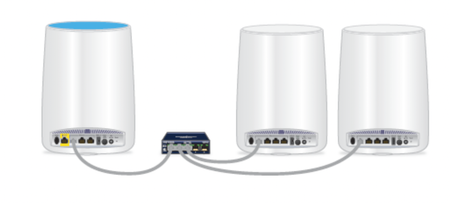
CM1200 -> RBR850 AND GS348 (on LAN port); 3-4 RBS850's connected into the GS348
Remember the CM1200 does NOT have a router built in. Its only a modem.
Netgear has set up a community forum specifically for the Orbi AX products. Most of the people who watch that forum are more likely to have experience with Orbi AX (WiFi6 RBK 3,7,8 and 9 Series) products. Might be more likely to find someone who has a solution if the question is posted there:
https://community.netgear.com/t5/Orbi-AX/bd-p/en-home-orbi-ax
Please use this link to the main forum product list to review and choose where to make your posts.
https://community.netgear.com/t5/NETGEAR-Forum/ct-p/en-netgear
Thank you.