NETGEAR is aware of a growing number of phone and online scams. To learn how to stay safe click here.
Forum Discussion

QC91
Dec 17, 2019Aspirant
Slow WiFi 2.4 GHz on Orbi
We have an RBR50 with 2 Satellites we Just Started to have slow Speed on the 2.4 GHz WiFi only, we have had the RBR50 for just over 1 Year and have never had any Speed issues, we have not moved any...

FURRYe38
Dec 17, 2019Guru - Experienced User
What is the Mfr and model# of the ISP modem the NG router is connected too?
What is the size of your home? Sq Ft?
What is the distance between the router and satellite(s)? 30 feet is recommended in between RBR and RBS to begin with depending upon building materials when wirelessly connected. https://kb.netgear.com/000036466/How-far-should-I-place-my-Orbi-satellite-from-my-Orbi-router
What channels are you using? Auto? Try setting manual channel 1, 6 or 11 on 2.4Ghz and any unused channel on 5Ghz.
Any Wifi Neighbors near by? If so, how many?
Try disabling the following and see:
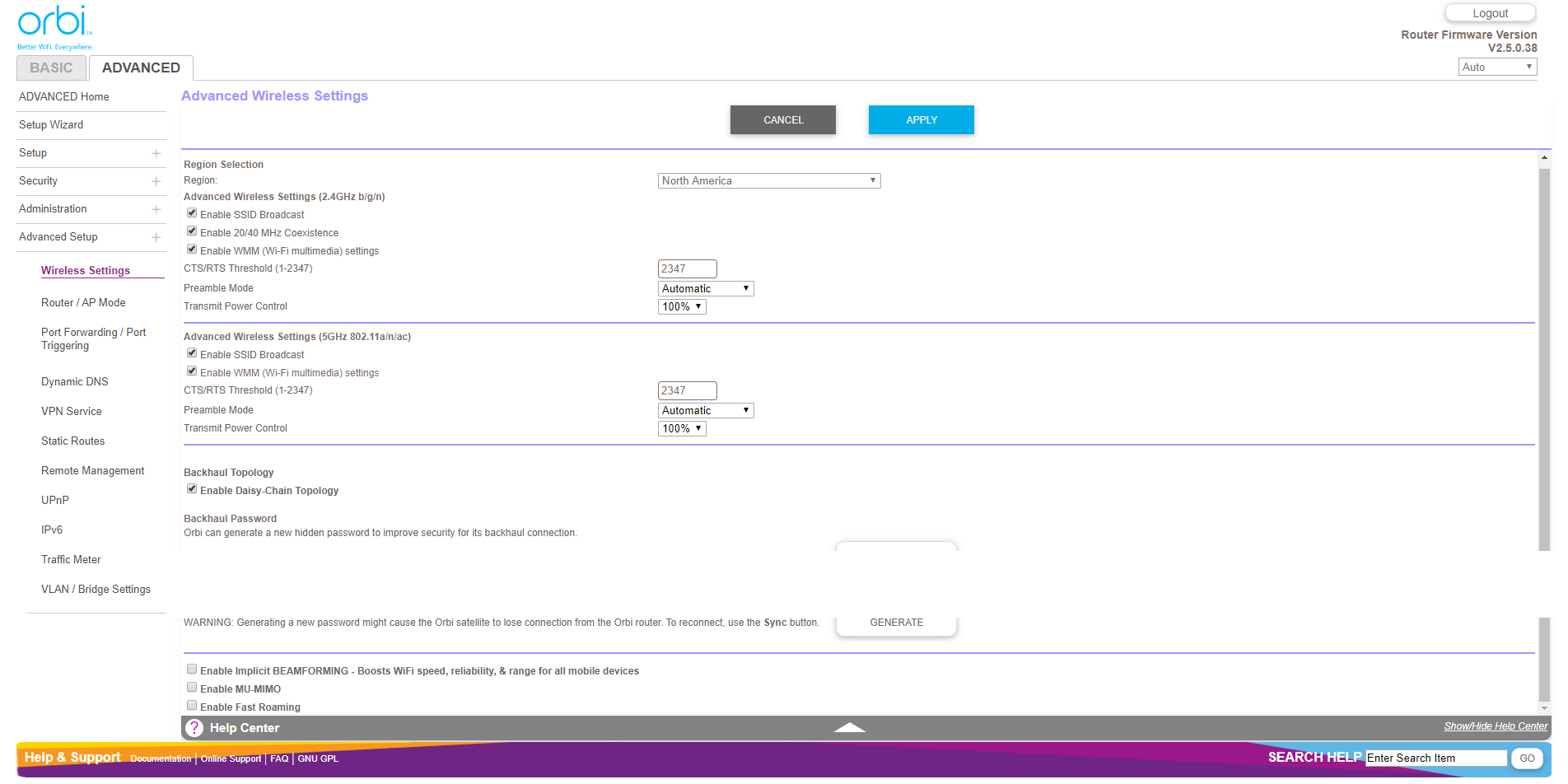
Armor, Circle, Daisy Chain, Fast Roaming, IPv6 and Set 20/40Mhz Coexistence to 40Mhz only. Save settings and reboot the router and satellite(s).
Has a factory reset and setup from scratch been performed since last FW update?
There is new FW available as well, v2.5.1.8:
https://community.netgear.com/t5/Orbi/Firmware-v2-5-1/m-p/1837523/highlight/true#M78418
New FW is working for me and others.
QC91
Dec 17, 2019Aspirant
Hi, Thanks for all the replies
What is the Mfr and model# of the ISP modem the NG router is connected too? Arris SURFboard SB8200 DOCSIS 3.1
What is the size of your home? Sq Ft? 1700, We have had the system up for just over a year and have not moved anything we can be sitting in front of the router a few feet but it does not help with the 2.4 GHz
What channels are you using? Auto? Try setting manual channel 1, 6 or 11 on 2.4Ghz and any unused channel on 5Ghz.
Any Wifi Neighbors near by? If so, how many? Auto
Try disabling the following and see:
Armor, Circle, Daisy Chain, Fast Roaming, IPv6 and Set 20/40Mhz Coexistence to 40Mhz only. Save settings and reboot the router and satellite(s)Armor, Circle, Daisy Chain, are disabled
- FURRYe38Dec 17, 2019Guru - Experienced User
Just checking the modem. Good here.
So if you turn OFF the RBSs and leave just the RBR online. Speeds are slow on 2.4Ghz?
What device are using to test 2.4Ghz?
Try setting manual channel on 2.4Hz to 1, 6 or 11.
- FURRYe38Dec 17, 2019Guru - Experienced User
Also what speeds are you expecting to see on 2.4Ghz?
Speed still good on 5Ghz?
What speeds do you pay for UP and DOWN from you ISP?
QC91 wrote:Hi, Thanks for all the replies
What is the Mfr and model# of the ISP modem the NG router is connected too? Arris SURFboard SB8200 DOCSIS 3.1
What is the size of your home? Sq Ft? 1700, We have had the system up for just over a year and have not moved anything we can be sitting in front of the router a few feet but it does not help with the 2.4 GHz
What channels are you using? Auto? Try setting manual channel 1, 6 or 11 on 2.4Ghz and any unused channel on 5Ghz.
Any Wifi Neighbors near by? If so, how many? AutoTry disabling the following and see:
Armor, Circle, Daisy Chain, Fast Roaming, IPv6 and Set 20/40Mhz Coexistence to 40Mhz only. Save settings and reboot the router and satellite(s)Armor, Circle, Daisy Chain, are disabled- QC91Dec 17, 2019Aspirant
I disconnect both satellites and seated 3 feet away from the RBR50 and tested the 2.5 GHz with both my phone and laptop my ISP speed its only 50 Mbps
Also what speeds are you expecting to see on 2.4Ghz? 200 Mbps or more
Is speed still good on 5Ghz? YES
What speeds do you pay for UP and DOWN from you ISP 260 Mbps Down and 12 Mbps UP
I also did wifi analyzer software and I only thing I see is hidden network from the satellites what must be the backhaul will attach photos
- QC91Dec 17, 2019Aspirant

