NETGEAR is aware of a growing number of phone and online scams. To learn how to stay safe click here.
Forum Discussion

EnglishHacker
Jan 26, 2021Aspirant
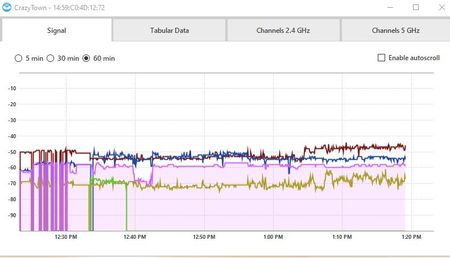
Solid connection to constant drops on all channels
Using RBR20 and one Satellite - Firmware 2.5.1.16. Downloaded Netspot to look at why I was constantly getting drops. I initially thought it was my internet connection but it's my WiFi. I restarte...
- Jan 27, 2021
So if you saw with with out the Orbi in the mix, I presume it was the changes you did and someting on the PC that seems fixed after you rebooted it.
Please mark your thread as solved so others will know.
Enjoy :smileywink:

FURRYe38
Jan 26, 2021Guru - Experienced User
What is the Mfr and model# of the Internet Service Providers modem/ONT the NG router is connected too?
Has a factory reset and setup from scratch been performed since last FW update?
What is the size of your home? Sq Ft?
What is the distance between the router and satellite(s)? 30 feet or more is recommended in between RBR and RBS to begin with depending upon building materials when wirelessly connected.
https://kb.netgear.com/31029/Where-should-I-place-my-Orbi-satellite
What channels are you using? Auto? Try setting manual channel 1, 6 or 11 on 2.4Ghz and any unused channel on 5Ghz.
Any Wifi Neighbors near by? If so, how many?
Try disabling the following and see:
Armor, Circle, Daisy Chain, Fast Roaming, IPv6 and Set 20/40Mhz Coexistence to 40Mhz only. Set Short preamble instead of Long preamble modes. Save settings and reboot the router and satellite(s).
One User Experience/Configuration:
https://community.netgear.com/t5/Orbi/Most-Stable-Orbi-Configuration/m-p/1941087/highlight/true#M97026
EnglishHacker
Jan 26, 2021Aspirant
Thank you.
Modem: Rogers Hitron CODA 4582. No factory reset or setup from scratch since last FW upgrade. I'll come back to this if needed. Why would this impact what I'm seeing with the wifi channel strength?
Size of home: Approx. 4800 sq ft over 3 levels (one of which is a basement)
Channels: Was Auto but now changed to 1 and 36. Four neighbours' SSIDs can be seen.
I've disabled everything recommended, saved and rebooted.
- FURRYe38Jan 26, 2021Guru - Experienced User
What mode is your modem working in? Your ISP Modem already has a build in router and wifi. This would be a double NAT (two router) condition which isn't recommended. https://kb.netgear.com/30186/What-is-Double-NAT
https://kb.netgear.com/30187/How-to-fix-issues-with-Double-NAT
Couple of options,
1. Configure the modem for transparent bridge or modem only mode. Then use the Orbi router in router mode. You'll need to contact the ISP for help and information in regards to the modem being bridged correctly.
2. If you can't bridge the modem, disable ALL wifi radios on the modem, configure the modems DMZ/ExposedHost or IP Pass-Through for the IP address the Orbi router gets from the modem. Then you can use the Orbi router in Router mode.
3. Or disable all wifi radios on the modem and connect the Orbi router to the modem, configure AP mode on the Orbi router. https://kb.netgear.com/31218/How-do-I-configure-my-Orbi-router-to-act-as-an-access-point and https://www.youtube.com/watch?v=H7LOcJ8GdDo&app=desktop- EnglishHackerJan 27, 2021Aspirant
Yes, was already in bridge mode, with the modem not being used as a router.
Further to the changes you suggested yesterday I reset the modem. In doing so it reverts to the dual modem/router functionailty. I ran it this way for approx. 30 mins (eliminating Orbi from the chain). I reviewed the NetSpot logs and saw exactly the same issues - solid then bouncing. The bouncing started at the moment I was on a videoconference.
I then went back to bridge mode and utilized Orbi. Again, performance was stable until I had another VC, then more bouncing. I tried this a few times and every time the VC kicked off the eratic signal strength.
Next step, I restarted my PC. Everything has been stable for 15 hrs since, including through multiple VCs. I think it's solved. Was it a combination of the changes and a PC restart?
- FURRYe38Jan 27, 2021Guru - Experienced User
So if you saw with with out the Orbi in the mix, I presume it was the changes you did and someting on the PC that seems fixed after you rebooted it.
Please mark your thread as solved so others will know.
Enjoy :smileywink: