NETGEAR is aware of a growing number of phone and online scams. To learn how to stay safe click here.
Forum Discussion

alphabeta77
Jan 12, 2022Tutor
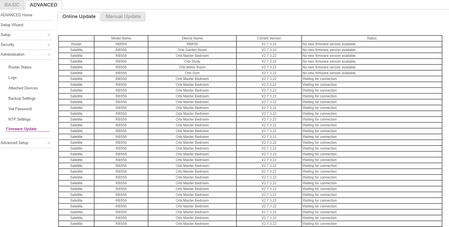
Turning on satellite results in thousands of satellites appearing , then crashing wifi??
Hi all, Having a strange issue where one of my satellites is just creating hundreds of duplicates and then crashing the wifi eventually. It's a wired connection, have tried re-syncing and fac...
alphabeta77
Jan 12, 2022Tutor
Hi both,
Quick answers to questions:
- No it doesn't occur on the attached devices screen
- Browser - tried Edge and Chrome
- Factory Reset - yes, just tried it (ie factory reset with pin in back till flashing amber, also then switched off and deleted record from Orbi, now failing to successfully sync)
- Cat6 cable being used
- Wireless sync - yes, currently have it unplugged entirely and trying to get it to sync at all.
Shout if I've missed any questions or any other ideas!
TC_in_Montana
Jan 12, 2022Virtuoso
Something similar to this was reported a few years ago. The person did not state it was on the firmware update page but I knew that I had seen something like this.
Here is a link to that issue on the Community forum:
Definitely sounds like a corrupted firmware somewhere. While it seems like it might be the satellite that is repeating itself, it may not be - it may be the router itself with a slight corruption in the firmware.
My first approach would be to manually "disconnect" the satellite showing up multiple times through the attached devices screen, then resync it. See if this resolves the issue.
If not, then I would would try to update the satellite's firmware (update to the same version) manually - not through the update page - by logging into the satellites by IP address and doing a firmware update from there. You may want to do EACH of the satellites just in case, then do the same thing for the router.
After updates are completed, turn off the satellite(s), turn off the router, and then turn on the router, and bring each satellite back up individually.