NETGEAR is aware of a growing number of phone and online scams. To learn how to stay safe click here.
Forum Discussion

Steiny05
Oct 10, 2021Aspirant
Unable to connect my NETGEAR ORBI RBK13 WIRELESS AC1200 MESH ROUTER to Foxtel NBN modem.
Hello everyone, I have tried to connect my Orbi Wireless Mesh Router to the Foxtel Hub NBN Modem but I am getting that the modem is not compatible. It is very confusing ass the modem is frim Netgear...
- Oct 11, 2021Hello everyone, thank you very much for your help. I was able to eventually connect my Orbi to the internet. This has made my kids ecstatic, no more coverage issues.
Again thank you for your time and efforts.
Mark
Steiny05
Oct 10, 2021Aspirant
I apologies in advance, I am not very IT minded. The Foxtel Hub is for the NBN. I have IQ4 from Foxtel.

CrimpOn
Oct 10, 2021Guru - Experienced User
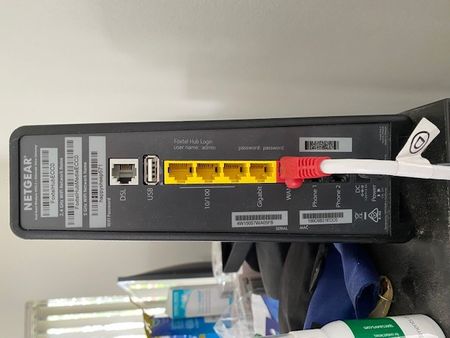
It would be helpful if you can describe how the product label on each piece of equipment identifies it.
That will enable people on the forum to look up the user manuals for these devices.
p.s. One of the dreadful features of the Netgear community forum is that images placed "in-line" using the Photos icon in the menu bar are not visible to other users until they are approved by a forum moderator. There are few moderators and sometimes this can take hours (or days).
Images "attached" using the Browse button in the lower left are available to others immediately.
(In other words, you went to a lot of effort to provide information and Netgear won't let anyone see it. - sigh)
- Steiny05Oct 10, 2021Aspirant
- Steiny05Oct 10, 2021Aspirant
Sorry I posted the link to the picture to the back of the modem and also of the front. Hope this helps.
- CrimpOnOct 10, 2021Guru - Experienced User
This is very helpful, thanks.
This is a combination modem/router/WiFi device. It is intended to provide the Foxtel customer with a complete home networking solution, similar to the Netgear Orbi.
There are two ways to integrate the Orbi RBK13 system:
- Unplug that ethernet cable with the red connector from the FoxTel and connect it to the RBK10 WAN port.
In essence, do not use the FoxTel device at all.
Let it sit in a box somewhere in case the Orbi fails or to return when (if?) you terminate the FoxTel service and they want it back.
This has the benefit of having only one router and only one WiFi network in the house. - Use an ethernet cable to connect the Orbi WAN port to one of the Foxtel's yellow ethernet ports.
Once the Orbi is connected, in about three minutes it should begin broadcasting the WiFi name (SSID) that is printed on the product label and devices can connect to it using the password printed on the label.
This will result in having two routers (Foxtel and Orbi), two ethernet networks, and two WiFi networks in the house, which has the potential to cause problems in the future. https://kb.netgear.com/30186/What-is-Double-NAT
If any of these potential issues apply to you, then there are ways to turn one of the devices into "not a router".
- Unplug that ethernet cable with the red connector from the FoxTel and connect it to the RBK10 WAN port.

