NETGEAR is aware of a growing number of phone and online scams. To learn how to stay safe click here.
Forum Discussion

madbrain
Oct 02, 2017Luminary
Unable to setup Chromecast Ultra over Wifi - claims it was made for a different country !!
I just bought a Chromecast Ultra at Best Buy in California and tried to set it up on my Orbi AP, bought in California also. This is the error I get . I had to use my DSLR to shoot a picture of th...
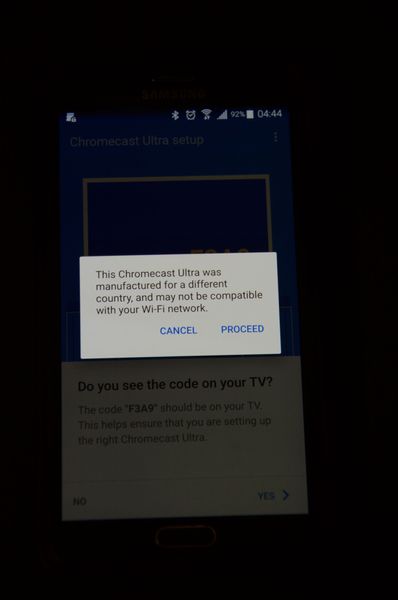
madbrain
Oct 02, 2017Luminary
A
I tried it over Ethernet and it updated its firmware and worked fine.
Unplugged Ethernet, and still faced the same issue. Couldn't set Wifi.
Then, I turned off "Implicit Beamforming" in Orbi.
I was then able to proceed with the Chromecast Ultra setup. But I still experienced the strange dialog above !
Is my Orbi really using foreign Wifi frequences ? Can I expect the FCC to come knocking at my door ?
Once the Chromecast Ultra was setup, I re-enabled beamforming. The Chromecast ultra still worked on Wifi.
Go figure !
 martyfpOct 02, 2017Luminary
madbrain wrote:Is my Orbi really using foreign Wifi frequences ? Can I expect the FCC to come knocking at my door ?
Take a look at "Advanced settings --> Wireless Setup". There is a Region Selection at the top of the page. You should double check that is set right.
- madbrainOct 02, 2017Luminary
I checked. It was set to "North America".
- madbrainOct 02, 2017Luminary
I ran Wifi Analyzer on my phone and enabled all the 5GHz channels (tons of them!) . It shows that my SSID is on 5 GHz channels 36 through 50. But there is also another network on channels 149 to 161 . No SSID there. Presumably, this is the Orbi backhaul network.
Maybe that is what is confusing Chromecast Ultra ? That is a 5 GHz device with 802.11ac.