NETGEAR is aware of a growing number of phone and online scams. To learn how to stay safe click here.
Forum Discussion

JPPMD
Jul 06, 2018Guide
Unstable network—need advice (warning—long)
I would appreciate some help and advice from this community (and the experts like furry and any Netgear folks) on how to get my network faster and more stable. Here are the details:
Comcast Gig...

FURRYe38
Jul 06, 2018Guru - Experienced User
What is the model# of the ISP Modem your using with the Orbi?
What is the model# of the non managed switch?
Seen others express problems with the orbi operation after a power outage. Something I have not experienced thus far. However i won't discount anything right now.
I recommend disabling MIMO, Daisy Chain and run some tests. If your wanting to use wired back haul, definately disable Diasy Chain as it's not needed when wired back haul is used.
I would use manual channel 1, 6 or 11 regardless of others being on same channel, just pick a channel that has less neighbors on it or farther away.
Once you get wired back haul workng, you can lower the power out put of the radio on the router from 100% to say 75% and see how that does since you have neighbors near by.
I would do this first to get wired back haul working, First get a satellite in the same room with the router and make sure it's added via wireless. If the top led comes on BLUE, then connect a LAN cable directly from the back of the router to the satellite. Give 5 minutes time and the top LED should come on PInk the BLUE. If you get BLUE, then you know the satelllite is working on wired back haul. ALso means that the connection between the router and satellite is good on wired back haul when no switches are in the middle. Power OFF the satellite then back back into remote location with LAN connection. Power ON and wait for the top led to turn on BLUE. if it doesn't this means there is a problem between the remote location and the router. Possible bad cabling or switch issue.
- JPPMDJul 07, 2018Guide
Furry:
Many thanks for the prompt reply. First, to answer your questions:
Netgear JGS516 16 port gigabit unmanaged switch
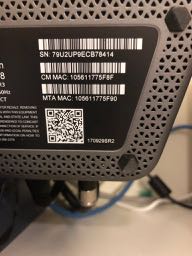
The Xfinity/Comcast Gig gateway seems proprietary, so no model number. Here is a photo of the plate:
As you directed, I first turned off MIMO and changed the channel to 6. Things seemed stable. I then turned OFF Daisy Chain (remember that my satellites are in fact daisy chained with Good backhaul status). This rebooted by system. After this, once the system came back up and the satellites reconnected, the configuration was now a star topology, and the satellite on the main floor (the one previously at the end of the daisy chain) now showed Poor backhaul status. My WiFi speed at the main floor satellite really suffered (now 25-40 compared to 75-100).
OK, so now to try the wired backhaul. Per your instructions, I took the main floor Satellite down, plugged it next to the router, waited for the blue light. Then I connected a good patch cable from the satellite to the back of the router. Waited for the pink light, then the blue light. However, the orbilogin page never saw a wired backhaul established. I tried this again several times, and got the pink-blue lights. So I bought this unit back to the main floor and plugged it in with the ethernet LAN cable connected. Now I could not connect, and the router was struggling (WiFi dropping in and out). I gave up, pulled the ethernet cable from the satellite, and got the wireless backhaul back working.
I then tried the satellite on the 2nd floor. Same drill--plugged it in next to the router, waited for pink-blue. Again, no indication on the orbilogin page that I had a wired backhaul. But I brought it back up to the 3nd floor and tried to connect it to the LAN. No joy. Just would not connect well, and the router was having trouble (intermittent dropout and WiFi cutting in and out).
So I disconnected the ethernet LAN cables from the satellites. Now I had a system with Poor wireless backhaul to the main floor unit (remember I turned OFF Daisy Chain). So I turned Daisy Chain back ON, allowed the system to reboot, and power cycled the satellites. Unfortunately, now the main floor satellite won't daisy chain to the 2nd floor, and my wireless backhaul is Poor.
So now if anything I am worse off then I was. Still on wireless backhaul, but not daisy chained, and poor wifi on the main floor. Still manually set to 2.4 gig WiFi Channel 6.
Is there a Netgear tech on the forum? Any ideas? I'm very frustrated.
- FURRYe38Jul 07, 2018Guru - Experienced User
You can try with Daisy Chain enabled. Power cycle the satellites and router after re-enabling the Daisy chain.
I would try the wired back haul again. Wired back haul will be preferred if your lan cabling between the router and satellite is good. If your switch is non managed this shouldn't effect the connection either.
Did you get a GOOD status when you has the satellite wired connected first near the router. You have to either refresh the web page or log out then back in to see a change in the status after getting the satellite wire connected.
Regarding your isp gateway:
Couple of options,
1. Configure the modem for transparent bridge mode. Then use the Orbi router in router mode.
2. If you can't bridge the modem, disable ALL wifi radios on the modem, configure the modems DMZ for the IP address the Orbi router gets from the modem. Then you can use the Orbi router in Router mode.
3. Or disable all wifi radios on the modem and connect the Orbi router to the modem, LAN to LAN and configure AP mode on the Orbi router.- JPPMDJul 07, 2018Guide
Furry:
I did power cycle all units after re-enabling Daisy Chain ON. Still have a star topology.
My Comcast gateway is in Bridge mode and WIFi off--just a 'dumb' box providing raw unfiltered Ethernet. I need the Orbi router to do 'router mode' and handle DHCP/NAT and fixed IP addresses and port forwarding.
Yes. when I brought each satellite down next to the router and power cycled, all showed Good backhaul status in the orbiologn page. All went through the pink-blue light bootup sequence. And all satellites showed Good backhaul status on orbilogin when set up at the router, whether in wireless or wired mode, but at no time did the orbilogin page actually show either satellite in wired backhaul mode. And, yes, I did refresh the orbilogin page, logged in and out, even disconnected and reconnected WiFi (since the router is very unstable when trying to get things re-connected).
If I want to try wired backhaul again, can I just connect an ethernet patch cord to each satellite and plug it into my LAN, and just wait? Do I need to reboot the Satellite, or the modem, after I plug it in? Will I see the pink and then the blue light?
Thanks for sticking with me here...I would really like to get this all wrung out.