NETGEAR is aware of a growing number of phone and online scams. To learn how to stay safe click here.
Forum Discussion

aesterling
Jun 09, 2022Aspirant
Wireless IP cameras have unstable connection with Orbi
Hello, I just installed an Orbi 3-pack at my house (one RBR40 and two RBS40 satellites) and now my wifi IP cameras are having connection problems. This Orbi system replaced a Google Wifi Mesh 3-p...
aesterling
Jun 09, 2022Aspirant
CrimpOn thanks for the response. You are correct, all but one camera (Wyze) is connected to the router and not the satellite, even though most are much closer to the satellite. I will reboot the cameras and see if they switch to the satellite, check performance, and reply here. Thanks!
aesterling
Jun 09, 2022Aspirant
I've rebooted all five cameras.
The three closest to the front satellite are now connected to it instead of to the router.
The two cameras in the middle of the house are still connected to the router.
Performance has not improved, unfortunately.
For example, each camera has a live timestamp on the video so I can watch the seconds counting up.
On the cameras with the best connection, the video will stream nicely for a few seconds, then freeze for 5-10 seconds, then the live stream will continue.
On the cameras with the worst connection, it won't even load the stream.
Another interesting example is, after the reboot, I was watching a camera's live video and then attempted to also load the camera's web interface in my browser. As soon as I did so, the live stream from that camera stopped as well as the stream from other wireless cameras that are connected to that satellite. It's like the extra traffic from loading the webpage killed the signal to all of them momentarily.
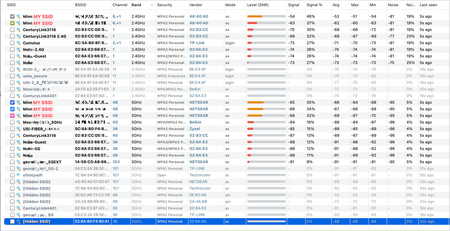
Here's a screenshot from one of the camera's web interfaces that shows the wifi networks and signal strength. At the top of the list it shows my SSID two times. The top one it's connected to shows a signal strength of 100.
All of my wired devices seem to be working fine. Please let me know if you have any suggestions or tests I can do to troubleshoot. Thanks!
- CrimpOnJun 09, 2022Guru - Experienced User
I found no reference to any of those cameras being capable of beam forming or mimo, so those settings should be irrelevant I would tend to set them "on" so that devices capable of those features can use them.
It may be worth experimenting with the RTS/CTS Threshold. The default on the original Orbi series was set at 2347. I have seen comments indicating that the AX series typically has a lower value, perhaps as low as 64. Here's a short description:
Might try setting a lower value and see what happens.
If this was a retail purchase, this system qualifies for Netgear's 90 days of 'complimentary support'. After registering the product, there is a link to "Contact Support".
- aesterlingJun 09, 2022Aspirant
CrimpOn Thanks again! I will read the link and test other RTS/CTS Threshold settings. This was a retail purchase, but I recently received them from a friend as a hand-me-down, so the 90-day complimentary support no longer applies.
I appreciate your help and will reply if I make any progress! 😀
- JeffgearJun 10, 2022Virtuoso
If the RTS/CTS tweak doesn't work:
Have you tried powering off all but one camera and seeing what the performance is like?
If its fine, then try powering on another, then another until it becomes an issue. This may help point the issue to concurrent streaming connections per wireless node (router or satellite). One camera type may be triggering them all to be unreliable, so it may be a case of finding the culprit.
If it fails with just one camera powered on, and fails on either the router or satellite (you may have to move the camera to force it to associated with either node when troubleshooting), then it points to a specific connection/session compatibility issue between the camera and wireless node. That could be on either the camera (firmware or a setting) or wi-fi node (firmware bug or settings). As a last resort I'd try factory resetting a camera and trying that on its own. If that works, repeat for the others. An absolute last resort is reset of the wi-fi nodes but I dislike the nuke option as its a lot of faff.
I have 6 cameras but they all connect to their vendor's "hub/gateway" and that's connected to a satellite via ethernet. Personally I'd prefer your setup with cameras each directly connecting to their closest satellite as I had to faff about with the placement of the gateway and move its satellite to be near it to pick up all cameras with reliability.

