NETGEAR is aware of a growing number of phone and online scams. To learn how to stay safe click here.
Forum Discussion

trancedroid
Aug 24, 2015Aspirant
AirCard 785 Retail unlocked . Firmware update FAILED!
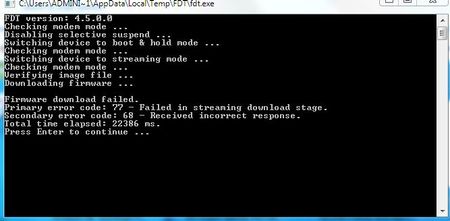
Hi! I tried to update the firmware of my device several times and it failed. I tried once manually using Telestra driver, and it still fails to update. On the website, there is no update for Air...
d4rr3ll
Aug 26, 2015Aspirant
Mine seems to be in a very odd state as well this morning after an OTH firmware update yesterday. This is a 785 retail unlocked version as well. When I powered it up the morning the display was wrong, the battery showed as 'undefined' and the top right servivce indicator just shows the 'no entry' sign. The device still works, but something has gone wrong with the firmware update. The left 'menu' button on the device no longer works either.
I have tried a factory reset via the web interface but that didn't work.
How can I write either the previous version of the firmware to the device, or have another do at the latest? I can't seem to find any firmware on the support site.

DarrenM
Aug 26, 2015Sr. NETGEAR Moderator
Hello trancedroid
Since you have a Retail unlocked 785 you shouldn't be trying to use the telstra firmware should be using the generic driver which will auto installs from TRU install when you tether to the device. Also make sure you have good signal strength when trying to update.
Hello d4rr3ll
you can try to do a factory reset by
To reset the hotspot:
1. Press the Power and Navigation buttons at the same time for five seconds.
2. Press the Navigation button to cycle to the Factory Reset cycle.
3. To start the factory reset, press the Power button. A factory reset takes about one minute.
4. After the device resets, reconnect WiFi devices
Try that and see if the LCD is still giving you the wrong things.
DarrenM
- trancedroidAug 26, 2015Aspirant
Hi. The thing is, the software downloaded the update several times but could not install it and gave an error. Now, every time I check for update, I never get any. The question is: Are there any updates for this device or not? What's going on?
- DarrenMAug 26, 2015Sr. NETGEAR Moderator
yes there is a Firmware update you may want to try a factory reset and then try to update the firmware again.
DarrenM
- trancedroidAug 26, 2015Aspirant
I did a factory reset and this is what I get.
"No update available
There are no updates available for your device at this time.
Please check again later."
By the way, this is the firware version I got right now:
FW Version:NTG9X25A_02.08.00.51FW Build Date:05/04/15
Can I download the update manually if there is one? There is no such link for my device on the website.
- d4rr3llAug 27, 2015Aspirant
Hi DarrenM,
I tried the factory reset and screen is still as it was before, the device still works. I tried updating after the factory reset, initailly it said update available when I did 'Check for Update', I tried to download it but nothing happened, now when I click 'Check for Update' I get an Update Error with the message "There was a problem updating your device. Please try again later.".
I'm happy to wait if a new release is imminent, and hopefully when a new update is available it will be able to update itself? When do you think the fixed firmware will be available?
My main issue right now is that it won't switch it's screen off when on battery, thus reducing the battery life significantly.
Thanks
Darrell
- DarrenMAug 27, 2015Sr. NETGEAR Moderator
Hello D4rr3ll
I have no ETA on that release but it sounds like there could be a issue with your device with the display you may want to contact netgear support if your still under warranty.
http://support.netgear.com/general/contact/default.aspx
DarrenM
- d4rr3llAug 27, 2015Aspirant
Hi DarrenM,
I'm unconvinced it's just the display, I think this is a direct effect of the firmware update. Surely there must be a way to flash an older version? Last thing I need is to be without my aircard waiting for a replacement to arrive under warranty.
Darrell
- trancedroidAug 27, 2015Aspirant
This discussion is about the device failing to update. Read the subject please and create your own discussion if your problem is not related to the subject. I'm getting e-mails about you replying and I'm not interested. Thank you!
- d4rr3llAug 27, 2015Aspirant
Erm. I have a retail unlocked 785 and the firmware failed to update, I'd say it's pretty much on topic. I guess you don't understand the concept of forums tracedroid? Anyway, so as not to cause you any further distress due to the 9 emails you have received, I'll open another thread that details the exact same problem. DarrenM - could you look out for the new thread please.