NETGEAR is aware of a growing number of phone and online scams. To learn how to stay safe click here.
Forum Discussion

Dustin_V
Oct 26, 2018NETGEAR Employee Retired
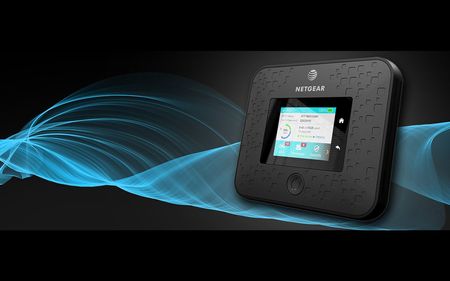
Nighthawk 5G Mobile Hotspot – World’s First Standards-Based Millimeter Wave Mobile 5G Device
The World’s First Millimeter Wave 5G Connection is here, thanks to AT&T! We’ve partnered up to deliver the Nighthawk 5G Mobile Hotspot, the first standards-based mobile 5G network device in th...
nhantenna
Dec 21, 2018Apprentice
I have to admit, the LTE-A I've been getting in the Philly suburbs has been very nice on my iPhone XS Max -- 100-160Mbit easy, sometimes as high as 240Mbit. Of course upload data rates are still very poor. And my iPhone runs laps around my MR1100.
If both the iphone and MR1100 are running on AT&T, a youtube with the devices running side-by-side would be very helpful. If you can demonstrate the MR1100 LTE-A is not working, existing MR1100 customers can pursue a replacement or upgrade to the 5G+ model with AT&T.
A benefit of netgear displaying the "5G E" indicator is to give customers insight to whether the tower they are connected to is LTE or "5G E". If netgear is not detecting "5G E" enabled towers correctly then the LTE-A features/functions will not be used.
nhantenna
Dec 21, 2018Apprentice
https://about.att.com/newsroom/2018/5g_evolution_market_update.html
this web page states: “As a reminder, 5G Evolution markets are locations where we’ve deployed technologies that enable peak theoretical wireless speeds for capable devices of at least 400 megabits per second. And, we plan to offer 5G Evolution in over 400 markets by the end of the year. In the first half of 2019 we plan to offer nationwide coverage, making 5G Evolution available to over 200 million people.”
"5G E" is way ahead of "5G+" in terms of rollout ("5G E" cell towers and "5G E" devices). During 2017 and 2018 my "5G E" nighthawk with a single 700MHz external antenna has:
1) *rare* peak 50Mbit download
2) *most of the time* 20's to 30's Mbit download
3) *most of the time* 6 to 17 Mbit upload
I consider these speeds to be normal "LTE" scores. I do not believe "5G E" is on my cell tower yet but there is no way to determine that by looking at the Nighthawk.
- nhantennaDec 21, 2018Apprentice
https://about.att.com/newsroom/2018/5g_evolution_market_update.html
The other technology we’re using to lay the mobile 5G foundation is LTE-LAA. With LTE-LAA, the network technologies have a peak theoretical wireless speed for capable devices of 1 gigabit per second. LTE-LAA is now live in parts of 20 cities with plans to reach at least 24 cities this year.
Even AT&T has a hard time describing "5G Evolution". AT&T states "5G Evolution" gets you "theoritical" 400Mbps, while LAA gets you an additional "theoritical" 600Mbps for a grand total of a "theoritical" 1000Mbps. In other words more than half of AT&T's hype machine 1Gbit speed is LAA. AT&T comes right out and says LAA is only "in parts of 20 cities". "In parts of" likely means certain streets or blocks just like 5G+. The way AT&T describes it here it sounds like LAA is NOT part of the "5G Evolution" set of technologies. Forget the names they call it, it sounds like the 400Mbps part will be nationwide by next summer which is pretty awesome. And since AT&T does not say what LAA is going to do in 2019, there is probably not much to talk about. "Theoritical" 400Mbps, let's assume half that speed in the real world with trees, buildings, weather, etc, giving us 200Mbps nationwide. 5G+ will not work for me anytime soon in my rural location, so I'm looking forward to 200Mbps on the "5G E" nighthawk.
- nhantennaDec 21, 2018Apprentice
"the LTE-A I've been getting in the Philly suburbs has been very nice on my iPhone XS Max -- 100-160Mbit easy, sometimes as high as 240Mbit."
This result jives with the 400Mbit "5G E" (without LLA) service estimate of 200Mbit peak score in the real world. 200-240 Mbit range I would say that iPhone is getting the correct and expected score that AT&T intended to deliver.
The question is what does the nighthawk 5G E get at the same location and time? My peak score on my 5G E Nighthawk is 50Mbit after running hundreds of tests over the last 12 months. There is no way I am reaching your "100-160Mbit easy" scores. It does not matter if I use WiFi or wired Gigabit ethernet, I can not get above 50Mbit. My guess is "5G E" is NOT turned on in my rural location yet.
- schumakuJan 18, 2019Guru - Experienced User
nhantenna wrote:
The question is what does the nighthawk 5G E get at the same location and time? My peak score on my 5G E Nighthawk is 50Mbit after running hundreds of tests over the last 12 months. There is no way I am reaching your "100-160Mbit easy" scores.
The Netgear 5G router announced end of October 2018, in the market since about mid December 2018 - unless you are an Alpha or Beta tester (and then you would be under an NDA) this is a blunt lie.
- JSchnee21Jan 18, 2019Virtuoso
Note that he said, "Nighthawk 5G E". Remember, that's AT&T's fake 5G. Also know as LTE-A to the rest of the world. I expect he is referring to his MR1100.
I'm not sure what an AT&T RAN is. Is this like a tier 3 or 4 network support engineer? It's hard enough to get to Tier 2.
My iPhone XS Max, when given a strong RF signal on an upgraded and lightly loaded tower routinely gets 150-220Mbit DL. In contract on the MR1100 on the same tower(s) I max out at ~90-110Mbit. I have verified that CA appears to be working on the MR1100. I routinely see at least two secondary carriers when benchmarking or streaking.
I suspect there is something amiss with QAM, MIMO, provisioning or both. But, I also cannot rule out poor 5GHz 802.11ac wireless. I haven't had time to try and benchmark the MR1100 on these towers using USB tethering.
But I have tried both 40MHz and 80MHz 802.11ac. Which give PHYS links of ~400Mbit and 866Mbit respectively to my iPhone as both devices are 2x2. 2.4GHz is off. I actually find the 40Mhz works a bit better as it has slightly better range and less interference.
A 400Mbit PHYS link should support ~40-60% of link rate in terms of real throughput. So I should have at least 200Mbit of real headroom -- but only see ~60-90Mbit routinely. 110Mbit was the fastest I've ever seen. I've seen one other post in which one person got 147Mbit DL on their MR1100, once.
Like I said, I see 150+ Mbit on my XSM every day. There are at least 10 towers I pass during my commute to work which give these speeds. That said, there are still many, many towers that max out at 30-50Mbit.
I do wish upload speeds were better. Both the MR1100 and XSM are terrible (5-15Mbit). Funny, my ZTE/AT&T Velocity 2 has great upload speeds (20-40Mbit) and it's download speeds are just shy of the MR1100.
- nhantennaJan 18, 2019Apprentice
"I'm not sure what an AT&T RAN is."
Radio Access Network Engineer. Someone who can see exactly what is happening on the AT&T side. You will likely have to provide your SIM card type info on the Nighthawk and iPhone. Run the speedtests through both devices. AT&T RAN will visually be able to see your connection details to explain what is happening. If you are connected to AT&T's network the RAN can see everything about that connection.
I have the 5GE Nighthawk (5G Evolution). I do NOT have a 5G+ Nighthawk (mmWave).
- JSchnee21Jan 25, 2019Virtuoso
Sorry, I don't have a screen shot on me. But if you follow these steps:
1) Connect MR1100 to PC via USB
2) Telnet to 192.168.1.1 5510 (note telnet to the IP of your MR1100, at port 5510)
3) Run this command in the Telnet session AT!GSTATUS?
4) Observer which bands you are connected to.
5) Initiate a speedtest on your laptop (I like Fast.net or the SpeedTest App (not url) from the Window 10 App store)
6) Run this command in the Telnet session AT!GSTATUS? again. You'll see there are now additional bands lists to support the active data session from the speed test. Assuming CA is available in your area.
