NETGEAR is aware of a growing number of phone and online scams. To learn how to stay safe click here.
Forum Discussion

astifidaki
Sep 25, 2024Aspirant
Nighthawk M6 PRO Wifi sleep mode from booting
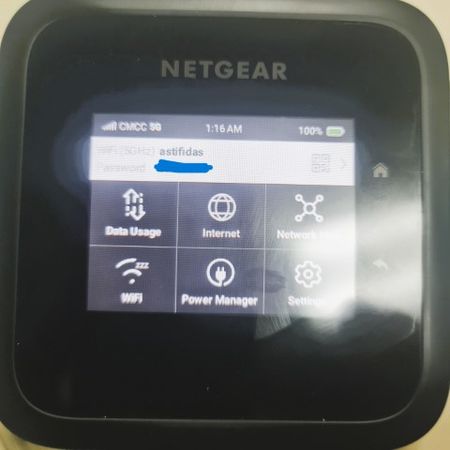
When I boot up my M6 pro (MR6500 - 1TLAUS) wifi icon appears with "zzz" and no wifi network name appears although i have on both 2.4GHz and 5GHz and the wifi standby is set to never. Tried to do fact...
astifidaki
Oct 04, 2024Aspirant
I am also trying to update or re-install the firmware but there is no option. Only option is for automatic update.
Has anyone had a similar problem? Have some tried to update firmware with any other way?
Any help at the moment would be appreciated as I cannot connect on the router with wifi but only by LAN cable
- rcpaxOct 12, 2024Luminary
astifidaki wrote:I am also trying to update or re-install the firmware but there is no option. Only option is for automatic update.
Has anyone had a similar problem? Have some tried to update firmware with any other way?
Any help at the moment would be appreciated as I cannot connect on the router with wifi but only by LAN cable
This is an ATT supplied/optimized device and thus ATT is responsible for the FW and Netgear does not release them for this model. From what I have gathered, ATT does not give out standalone FW for these devices and thus your only option is to get it when ATT pushes it over the air.