NETGEAR is aware of a growing number of phone and online scams. To learn how to stay safe click here.
Forum Discussion

jleon71
Apr 05, 2021Aspirant
GS324TP S350 unable to obtain IP from unifi USG3 and UAP-AC-PRO
Hello everyone, I have been trying to configure multiple vlans to be accessible on my unifi AP. I read similar post where people indicated they were successful, however I have not been lucky enough t...
DietmarItsMe
Jul 09, 2021Aspirant
Hi schumaku,
seems my success was called too early. IAfter rebooting the AP the problem stays as I've seen it before.
Here my question.
The DM does not TAG VLAN 1 , and it is impossible to configure it for VLAN 1. Would it be a good decision to configure the DM Management LAN with VLAN 2. The switch needs to have the Management VLAN to be tagged. If the switch defaults to 1 and DM to no Tag, would they even talk together? I assumed the PVID and an untagged Port would solve this, but does it?
Thanks

schumaku
Jul 09, 2021Guru - Experienced User
Lot's of training seems to be required here - most general VLAN and Ubiquity specific - very few Netgear switch related.
DietmarItsMe wrote:
The DM does not TAG VLAN 1 , and it is impossible to configure it for VLAN 1.
Yes, this is siilar to what I mentioned ref. the UniFi APs, too.
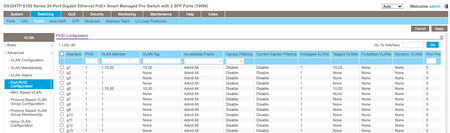
Configure the ports where you are connecting the DM and the APs for VLAN 1 [U]ntagged and PVID 1. This makes the switch sending VLAN 1 frames untagged, the PVID 1 assigns incoming untagged frames to the VLAN 1. (the second is about the only Netgear switch specific thing).
DietmarItsMe wrote:
The switch needs to have the Management VLAN to be tagged. If the switch defaults to 1 and DM to no Tag, would they even talk together?
No. Where is this information coming from? The config says the switch does make use the VLAN 1 for the management. How the management access comes to the switch is not relevant.
The VLAN 1 traffic be on a trunk port where the VLAN 1 it [T]agged (not just on the switch, also the connecting device to this network link - this is what one would typically do if multiple VLANs are transported on the same link - unless devices require one VLAN untagged), or it can be VLAN 1 frames untagged, the PVID 1 assigns incoming untagged frames to the VLAN 1 as explained.
DietmarItsMe wrote:
I assumed the PVID and an untagged Port would solve this, but does it?
See above.
- DietmarItsMeJul 09, 2021Aspirant
Hi schumaku,
thanks for filling my knowlege holes :-) and helping me out here.
I do have, the DM and AP on PVID 1 and [U]ntagged for VLAN1
All the other VLANs are Tagged on both ports, my assumption was that this would be a transparent way through the switch, as a direct connect to the AP to DM on the same DM Port works fine.
The AP continuously restarts with "Isolated/Restarting/RFScanning" state. The IP seems to be assigned now.
I'm lost, and the guy I pay for handle my Network suggests to buy a new switch from unify. I don't want to do this. :-(
Is there a diagram, video or anything out there explaining how the AP and DM communicate, and what kind of traffic needs to be enabled in order they could find and like each other?
- schumakuJul 09, 2021Guru - Experienced User
Yet another issue that is not a Netgear problem - your config looks fine based on the description, but I would double check things 8-)
Reads to me your APs can't reach the UniFi controller - this is either a the UniFi Cloud Key or the DM - is why ever not reachable, or does hang around in another VLAN and/or IP subnet. Again something that should reside on an untagged VLAN 1 by rule of thumb. Also check the APs (without a tagged management configured - just in case) VLAN and the controller are really on the same subnet (and VLAN).
Related Content
NETGEAR Academy

Boost your skills with the Netgear Academy - Get trained, certified and stay ahead with the latest Netgear technology!
Join Us!

