NETGEAR is aware of a growing number of phone and online scams. To learn how to stay safe click here.
Forum Discussion

gotty101
Nov 18, 2022Aspirant
GS728TPv2 strange behavior all aps' going down.
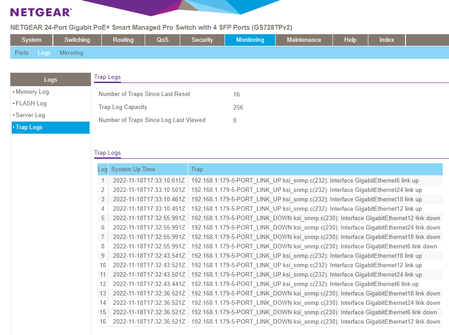
Hello, hopefully you can help me. The last few days ive installed a GS728TPv2 which power four Ubiquiti u6-pro access points. The cable to each one is cat6a and the cable tester said all is good. W...
gotty101
Nov 18, 2022Aspirant
This is a pic of the port stats
gotty101
Nov 19, 2022Aspirant
Just an update. On the section where it lists all the poe port states. Only one evr says delivering power, the othere 3 ports just say searching. When it plays up often the port that says is delivering power would change to another one. I've found when I do a speed test, some times you will see the speed build up and then just drops out and the test fails. But all the access points start flashing live the power has glitched.
- schumakuNov 20, 2022Guru - Experienced User
The switch web UI page System > PoE > Advanced > PoE Port Configuration would show much more useful information on the current PoE port status, indeed.
The GS728TPv2 can drive up to 24 PoE+ 802.3at ports and offers a max power budget of total 190W.
As the other peer we face UniFi https://dl.ui.com/ds/u6-pro_ds.pdf lazily specified as PoE+
Power method PoE+
Power supply UniFi PoE switch
48V, 0.5A PoE adapter (optional)
Supported voltage range 44—57V DC
Max. power consumption 13WUbiquity does still list a lot of confusing and misleading data. in the industry standard 802.3af/802.3at/802.3bt arena nobody should have to care about adapters, power information like 48V, 0.5A, or voltage range like 44—57V DC. they are still stuck in their non-industry standard passive power over network cabling terminology.
802.3at and max consumption of 13W does say everything clear.
Hard to say what is going on there, looks more like an interop issue.
- gotty101Nov 20, 2022Aspirant
Thanks for the reply, to help test things, today i swapped out the switch and just plugged all 4 ap's into a GS305P and its been totally stable. So its got to be to do with the GS728TPv2 for sure now.
ive looked at the System > PoE > Advanced > PoE Port Configuration screen and only one port (only for poe devices and one back to the switch) ever said drawing power, the rest said searching. I hadnt change any of the default poe settings that the switch is supplied with. One thing though was if i unplugged the device that was listed as drawing power then the screen would update one of the other three that where still plugged in and mark that as drawing power.
Trev
- schumakuNov 20, 2022Guru - Experienced User
Hello Trev,
gotty101 wrote:
Thanks for the reply, to help test things, today i swapped out the switch and just plugged all 4 ap's into a GS305P and its been totally stable. So its got to be to do with the GS728TPv2 for sure now.
This does not proof that much - except that we know now these APs are kind of operational off specs, and don't show any signs of information and warning about this.
The GS305E does only supply 802.3af and max 15.4W - so it's under the requirements set by the AP vendor.
PSE have two ways to classify a PD and are free to use either. The basic is one used by by most simple 802.3af units is the hardware-based method where a specific resistance is presented when the PSE presents the classification voltage.
Starting from higher class levels, it's all software-based making use of the the Link Layer Discovery Protocol (LLDP) requirement. And this is where I suspect the interoperability issues might come from. Aside, not the first similar PSE and PD interop issue in this industry - various vendors were affected by similar effects over the time.
gotty101 wrote:
ive looked at the System > PoE > Advanced > PoE Port Configuration screen and only one port (only for poe devices and one back to the switch) ever said drawing power, the rest said searching. I hadnt change any of the default poe settings that the switch is supplied with. One thing though was if i unplugged the device that was listed as drawing power then the screen would update one of the other three that where still plugged in and mark that as drawing power.
Here a complete screenshot with one active PD (AP) would be interesting to see.

Related Content
NETGEAR Academy

Boost your skills with the Netgear Academy - Get trained, certified and stay ahead with the latest Netgear technology!
Join Us!
