NETGEAR is aware of a growing number of phone and online scams. To learn how to stay safe click here.
Forum Discussion

HypnoTechie
Jul 30, 2023Aspirant
US-16-150W + GS308E + IP Cam on vLan 2
Hello, I have a UniFi US-16-150W switch which I've had to extend with a another switch GS308E in the garage. I've connected an IP Cam (Reolink RLC-511) to the GS308E and also have a direct conne...

schumaku
Jul 31, 2023Guru - Experienced User
HypnoTechie wrote:
I have a UniFi US-16-150W switch which I've had to extend with a another switch GS308E in the garage.
I've connected an IP Cam (Reolink RLC-511) to the GS308E and also have a direct connection from US-16-150W to GS308E.
My IP Cam network is running on vLan 2 as this is what I choose via the UniFi Network Manager for each device.
Reads to me as you have configured an simple access port, all untagged, for this camera on your UniFi switch.
If you intend to have a correct multi-VLAN configuration on the network create a trunk port for connecting the additional switch This requires a reconfiguration of your UniFi switch port, define a tagged trunk for the US.16-150W <-> GS308E, and finally an access port untagged for VLAN 2, PVID 2 to connect the camera.
HypnoTechie wrote:
The issue I'm having is that the IP Cam connected to GS308E is not being recorgnised in VLan 2.
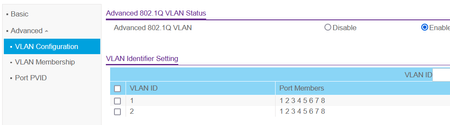
I've set the ports to have vLan enabled on them and also set the PVID to port 3 (camera port) and it does not work. The camera just does not get recorgnised on vLan 2 but s fine on vLan 1
For a simple flat untagged network extension, keep the GS308E config on the VLAN 1 config, and don't play with PVIDs without some basic VLAN know-how.
With defining the PVID 2 on the port where you connect the camera, you tell the switch to associate the untagged frames with the VLAN 2 - which does not exist, neither on the GS308E nor on the uplink (trunk) config on both sides. Of course, this can't work.
HypnoTechie
Aug 02, 2023Aspirant
I was able to eventually get this working by setting the ports on my switch to their appropriate vLan.
Each port then had a different switch connected to it and then their respective devices to the switches.
Related Content
NETGEAR Academy

Boost your skills with the Netgear Academy - Get trained, certified and stay ahead with the latest Netgear technology!
Join Us!
