NETGEAR is aware of a growing number of phone and online scams. To learn how to stay safe click here.
Forum Discussion

asmithlc
Feb 13, 2018Tutor
Cant access Web server from the outside
Hello All, I am running firmware 4.3.1-22 I am able to establish a stable connection through the prosafe easily . I am using NAT WAN mode. and all of the connected servers are able to establish ...
- Feb 15, 2018
Hello Guys, I have mananged to resolve my issue. For the benfirt of those who may experince this in the future.
If ytou have multiple Static Ips which would need to be assigned you need to rester them during the WAN setup.
It makes perfect sense but it was not clear in the documentation.Network Configuration --> WAN setup --> Secondary Addresses (Top Right)
Really hope this can help someone in the future.
Thanks
asmithlc
Feb 15, 2018Tutor
I am using NAT in the WAN Configuration, my WAN is static and i am assigned 5 static IPs. But i just cant seem to utilize them
I have one Web server which I have placed in the DMZ, is there an additional setting which must be set to allow the router to know that the public IPs 65.48.173.187 - 190 can be mapped or foward to the local LAN IPs.
All i need to have the web server accessibble from the outside. The firewall on the server itself have already been configured to allow traffic from the outside.
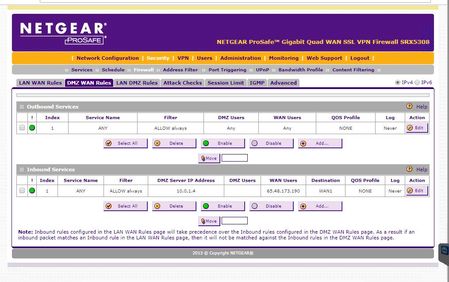
Please see the rules which I have set.
asmithlc
Feb 15, 2018Tutor
Hello Guys, I have mananged to resolve my issue. For the benfirt of those who may experince this in the future.
If ytou have multiple Static Ips which would need to be assigned you need to rester them during the WAN setup.
It makes perfect sense but it was not clear in the documentation.
Network Configuration --> WAN setup --> Secondary Addresses (Top Right)
Really hope this can help someone in the future.
Thanks
- JohnC_VFeb 15, 2018NETGEAR Employee Retired
Yes, you are correct. Setting up a block of IPs will be configured under the secondary addresses. Only the primary IP will be set under WAN IP. It seems that everything works ok now. I encourage you to mark the appropriate reply as the “Accepted Solution” so others can be confident in benefiting from the solution. The NETGEAR Community looks forward to hearing from you and being a helpful resource in the future!
Regards,

Related Content
NETGEAR Academy

Boost your skills with the Netgear Academy - Get trained, certified and stay ahead with the latest Netgear technology!
Join Us!
