NETGEAR is aware of a growing number of phone and online scams. To learn how to stay safe click here.
Forum Discussion

DanCan
Aug 09, 2015Aspirant
Can't connect to FVS318N L2TP VPN with Windows client - Error 789_case # 25689768
I have a FVS318N that has been in place for a couple of years. Recently I was asked by a couple of employees to enable VPN access. So I figured I would play with it and see what my options were/are...
DanCan
Aug 11, 2015Aspirant
Thanks for the suggestion DaneA, I had done all those steps except the Registry edit. I did that and rebooted, no joy.
I think it has to be something else because I can't connect even with Windows XP either.
Thanks,
Dan

DaneA
Aug 12, 2015NETGEAR Employee Retired
Hi DanCan,
I found this link below online. Kindly watch and follow the steps as this might help you:
https://www.youtube.com/watch?v=YCbxTVonZJc
Hope it helps :smileyhappy:
Regards,
DaneA
Netgear Community Team
- DanCanAug 17, 2015Aspirant
Yeah, tried the steps in that video, still no luck.
Just seems rediculous that this is so hard to get to work... there are only about a billion Windows machines out there. Surely someone has made this work.
Dan
- DaneAAug 17, 2015NETGEAR Employee Retired
Hi DanCan,
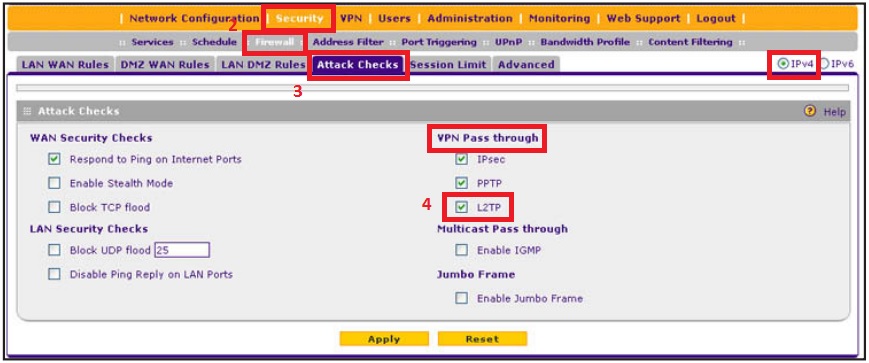
Is L2TP VPN Pass through enabled on your FVS318N? Kindly follow the steps below to verify:
a. On the web-GGUI of the FVS318N, go to Security > Firewall > Attack Checks. In the upper right of the screen, the IPv4 radio button is selected by default.
b. Make sure there is a check mark on L2TP under VPN Pass through.
c. Click Apply.
Regards,
DaneA
Netgear Community Team
- DanCanAug 17, 2015Aspirant
Yeah, passthrough is enabled already.
Maybe there is a better VPN option I should be trying? I was trying to avoid buying the VPN client, but that might be my only option.
DanCan
Related Content
NETGEAR Academy

Boost your skills with the Netgear Academy - Get trained, certified and stay ahead with the latest Netgear technology!
Join Us!
