NETGEAR is aware of a growing number of phone and online scams. To learn how to stay safe click here.
Forum Discussion

DanCan
Aug 09, 2015Aspirant
Can't connect to FVS318N L2TP VPN with Windows client - Error 789_case # 25689768
I have a FVS318N that has been in place for a couple of years. Recently I was asked by a couple of employees to enable VPN access. So I figured I would play with it and see what my options were/are...

DaneA
Aug 12, 2015NETGEAR Employee Retired
Hi DanCan,
I found this link below online. Kindly watch and follow the steps as this might help you:
https://www.youtube.com/watch?v=YCbxTVonZJc
Hope it helps :smileyhappy:
Regards,
DaneA
Netgear Community Team
DanCan
Aug 17, 2015Aspirant
Yeah, tried the steps in that video, still no luck.
Just seems rediculous that this is so hard to get to work... there are only about a billion Windows machines out there. Surely someone has made this work.
Dan
- DaneAAug 17, 2015NETGEAR Employee Retired
Hi DanCan,
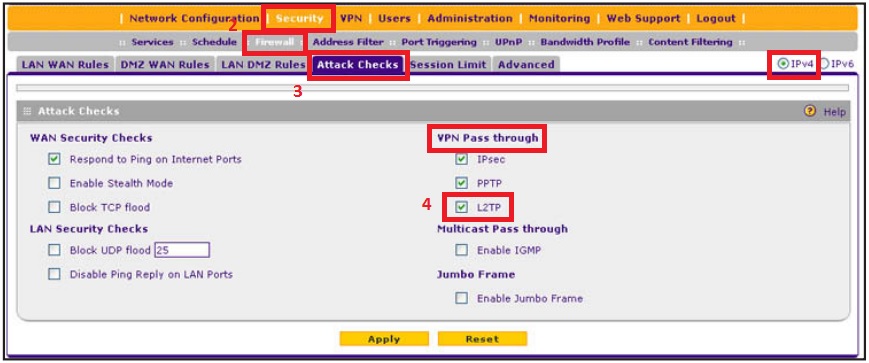
Is L2TP VPN Pass through enabled on your FVS318N? Kindly follow the steps below to verify:
a. On the web-GGUI of the FVS318N, go to Security > Firewall > Attack Checks. In the upper right of the screen, the IPv4 radio button is selected by default.
b. Make sure there is a check mark on L2TP under VPN Pass through.
c. Click Apply.
Regards,
DaneA
Netgear Community Team
- DanCanAug 17, 2015Aspirant
Yeah, passthrough is enabled already.
Maybe there is a better VPN option I should be trying? I was trying to avoid buying the VPN client, but that might be my only option.
DanCan
- DaneAAug 18, 2015NETGEAR Employee Retired
Hi DanCan,
You may want to try the 30-day trial period of using the VPN Client Professional Software. Check these links below for more information:
http://support.netgear.com/product/vpng01l
Regards,
DaneA
Netgear Community Team
Related Content
NETGEAR Academy

Boost your skills with the Netgear Academy - Get trained, certified and stay ahead with the latest Netgear technology!
Join Us!
