NETGEAR is aware of a growing number of phone and online scams. To learn how to stay safe click here.
Forum Discussion

zappalot
Mar 21, 2019Aspirant
VLAN Konfiguration für Gästenetz beim Netgear Switch GS108Tv2 mit Unify AP
Moin,
Ich habe eine Fritzbox 7490 als Router, einen UnifyCloudKey, Netgear Switch 108Tv2 sowie einen Unify AP. Die derzeit bestehende Konfiguration läuft prima.
Ich möchte jetzt noch das Gästenet...
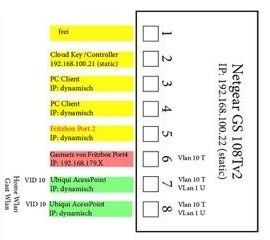
- Mar 27, 2019
Hallo zappalot,
im Prinzip musst du nur dafür sorgen, dass die Ports Mitglieder des VLAN sind.
VLAN1=Standard VLAN
VLAN10= Heimnetz
VLAN20=Gästenetz
Port4 = VLAN1, VLAN10, VLAN20
Port7= VLAN1 und VLAN10
Port8= VLAN1 und VLAn20
Alle anderen Ports auf VLAN1. und alles tagged.
Mit freundlichen Grüßen
FrankHe
Team NETGEAR
zappalot
Mar 22, 2019Aspirant
Vielen Dank für das Feedback. Benötige ich am Port 6, da wo der Gastnetz-Traffic der Fritzbox läuft, keine Einstellung? Wie erkennt Port 7 und 8, was VLAN1 und VLAN 10 ist?
Das "T" in der VLAN-Bezeichnung steht für "tagged".

FrankHe
Mar 27, 2019NETGEAR Employee Retired
Hallo zappalot,
im Prinzip musst du nur dafür sorgen, dass die Ports Mitglieder des VLAN sind.
VLAN1=Standard VLAN
VLAN10= Heimnetz
VLAN20=Gästenetz
Port4 = VLAN1, VLAN10, VLAN20
Port7= VLAN1 und VLAN10
Port8= VLAN1 und VLAn20
Alle anderen Ports auf VLAN1. und alles tagged.
Mit freundlichen Grüßen
FrankHe
Team NETGEAR