NETGEAR is aware of a growing number of phone and online scams. To learn how to stay safe click here.
Forum Discussion

ThomasNorway
Dec 22, 2023Aspirant
Orbi SXR80 and IPTV from ISP Telenor
Hello We experience problems with IPTV provided from Telenor, wich is a Norwegian ISP which also delivers IPTV via a box connected to internet. The TV box is connected to a Orbi satallite with...

schumaku
Dec 22, 2023Guru - Experienced User
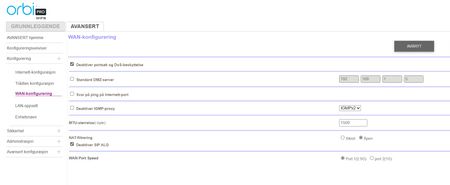
Maximum confusion for me now, as there is no NAT configuration similar to the older Nighthawk routers, allowing to configure a dedicated IPTV LAN there. Definitively need Netgear assistance here please (considering the community know-how tells us there is no IGMP snooping available on the Orbi systems. 8-/
BruceGuo and hnagaraju please - certainly on the Orbi Pro implementation side at least.
schumaku
Dec 22, 2023Guru - Experienced User
Curiosity question: Is the TV box connected to the SXR80 router on a LAN port (and on the default VLAN 1) or on the SXS80?
- ThomasNorwayDec 23, 2023Aspirant
Hi
The TV box is connected to SXS with LAN cable. Both SXS are connected to SXR with LAN cable.- schumakuDec 24, 2023Guru - Experienced User
I still fear the SXR80 is still limited to the same config options like the R9000 for example (and many other Netgear routers before and since...) on the Bridge Group ans VLAN Tag Group:
Said this: In either way, all you can do is assign one (or multiple) LAN ports of the router, where you could connect the IPTV Settop box. And No: This IPTV VLAN can (sill!) not leave the router e.g. over the wired or wireless backhaul - the Orbi Whole Home system is limited in this aspect, the IPTV network is not tightly integrated in the similar way ISP provided routers do, where user can add either direct connected IPTV Settop boxe(s), or add a switch (configured to support IGMP Multicast).
@ThomasNorway - that's why I've asked ref. your Orbi Pro SXR80. Are there no similar controls on your router? The SRS router would bring the VLAN support for the LAN 8-/
I wish Netgear would take more attention on such "basics", making the Orbi systems more useful and easier to integrate. That's all for now folks.
- ThomasNorwayJan 04, 2024Aspirant
Hello and thanks for answering!
So, with your suggested configuration as described below, I need to plug the TV box directly to the router on the assigned port?
The problem with that, is that the router is located on the 1st floor, and the TV box is on the 3rd floor.
See arrangement below.
Related Content
NETGEAR Academy

Boost your skills with the Netgear Academy - Get trained, certified and stay ahead with the latest Netgear technology!
Join Us!
