NETGEAR is aware of a growing number of phone and online scams. To learn how to stay safe click here.
Forum Discussion

Chuck-IV
Mar 31, 2023Guide
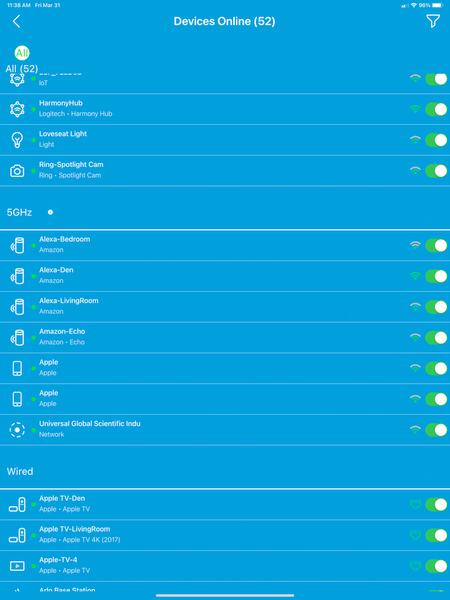
Anyone know how to get back to this look for the app...
So after the app update(when they broke the security portion, I started getting a Blue background view where the devices were split by how they were connected(2.4g/5g/wired) and had a Allow access sl...

FURRYe38
Mar 31, 2023Guru - Experienced User
What devices is this on?
Apple or Android or both?
I don't have armor however Device Manager on my iPhone is showing blue background, not white:
See same on a android pad as well.
There was a similar discussion of recent changes on NH app in regards to background colors, could be following on Orbi as well:
Chuck-IV
Mar 31, 2023Guide
So the blue screenshot is taken from my iPad and the white from my iPhone. The iPhone DID have the blue screen version when the Security Cloud issue was happening this morning.
However, when the security activated itself(I did a reset of my orbi 850 router this morning), the app went back to the white background screen.
I still have the Blue screen on my iPad because I haven't force closed it or touched the security portion since they fixed it.
I think this has to do with the Armor and Parental Controls they offer. While I am in a free trial of the Armor, I am not for Parental Controls.
FYI, this is on an RBK852 system.
- FURRYe38Mar 31, 2023Guru - Experienced User
Ok, I would presume that this will be a changed as mentioned in that link I posted. Based on if you have Armor or SPC enabled and the system is supporting of it, white background will be seen. Since I don't have either of these subscriptions currently, seems to point to this being what's happening.
- Chuck-IVMar 31, 2023Guide
I did disable the Armor and I never activated Parental Controls, so neither is active, but it is still on the white screen.
I am thinking the Blue screen version is for people who have a router that doesn't support Armor/PC in the app?
Either way, I just want the app to be CORRECT in the devices it shows connected/offline. Simply match what the web page says. It did when I had the blue screen and it is way off with the white screen.
- FURRYe38Mar 31, 2023Guru - Experienced User
I would submit a bug report thru the Orbi app.