NETGEAR is aware of a growing number of phone and online scams. To learn how to stay safe click here.
Forum Discussion

ACR85
Sep 25, 2022Follower
Armor Subscription Not Showing on Netgear APP
Hi Netgear Community,Help
I've received a notification email from Netgear saying that my Armor subscription for my RAX50 was coming to renewal date soon (19-Oct-2022).
My product (the only Netgear one I have) is fully registered on my Netgear account and onboarded on the Nighthawk App, and they say:
"For Armor or Smart Parental Control
Open your Orbi or Nighthawk app and go to Menu, click on My Subscriptions, followed by Subscription."
However:
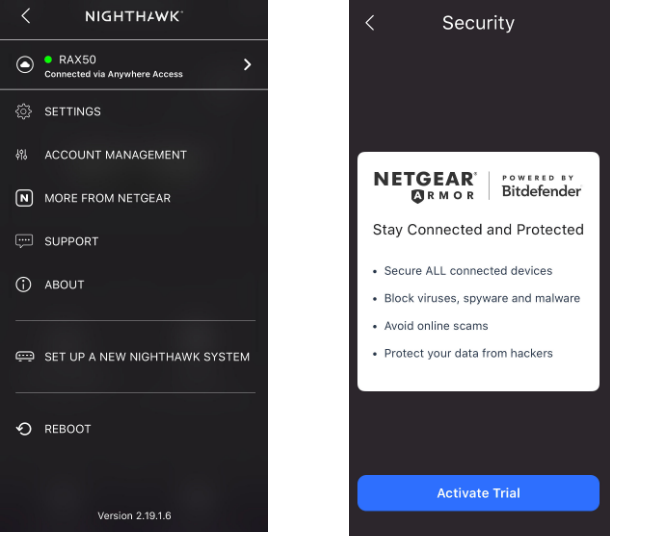
1- When I open the Nighthawk APP, 'My Subscriptions' doesn't appear on the menu, nowhere to be seen.
2- When I go to Settings -> Security, it only offers me to Activate a Trial !
3- When I go through the Web Support page it does confirm that my Subscription is Active for this product
Now getting yo the best thing, I want to manage this subscription and it says that I must go through the app to do it but as explained above I can't !!
---
To view your NETGEAR Armor subscription plan:
- Launch the Orbi or Nighthawk app on your mobile device.
- Enter your NETGEAR account credentials and tap Sign in.
- Tap the home icon in the upper-left corner of the screen.
- Tap Settings.
- Tap Security.
The Security page displays your current Armor subscription status and expiration date.
---
Now the big final, if I want to contact the Support Team I need to purchase a support contract!
So basically I am paying for a subscription that I can't manage, that doesn't seem to be 'online/active' on my device, and must PAY to obtain Support here!
---> Is this a joke??
Anyone got the same issue and could provide me with some advice?
Cheers,
AC
1 Reply
- michaelkenwardGuru - Experienced User