NETGEAR is aware of a growing number of phone and online scams. To learn how to stay safe click here.
Forum Discussion

Bcole
Mar 04, 2017Aspirant
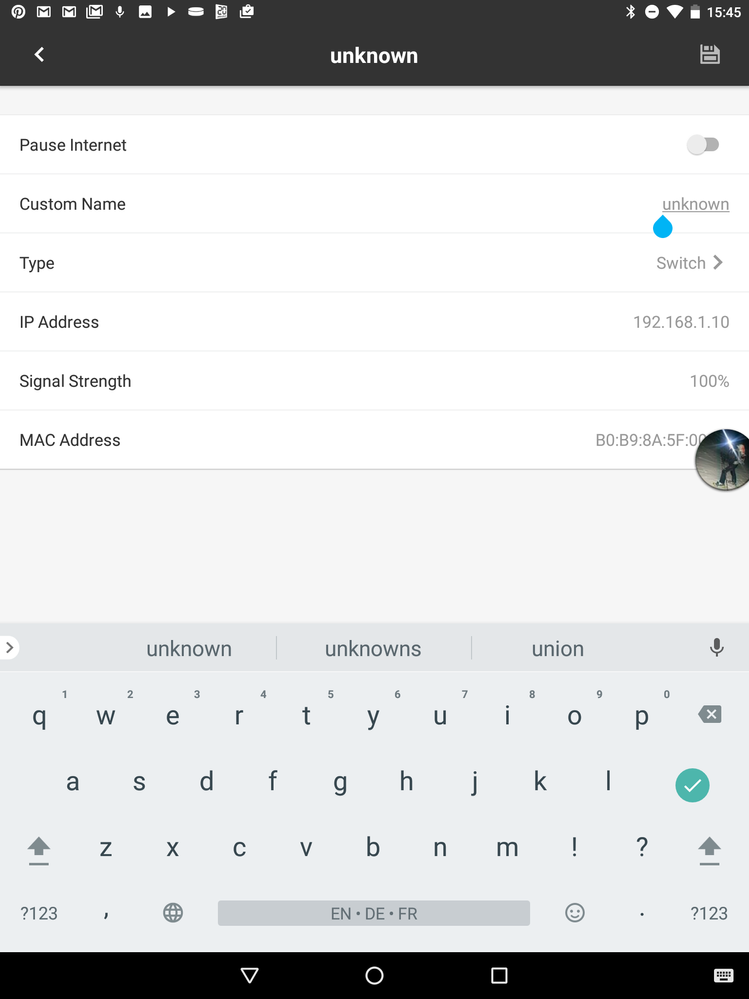
Bug genie 3.1.12 android network name change text field inactive for first rightmost character
On the name change field in the network map device dialog, unable to tap first character on the right to gain field focus. Seems like the right of the text field is outside of a screen's active view.
If you click on the second character or any character to yhe left you can get focus into the text field.
Suggestion is to increase the screen boarder my one character width.
3 Replies
- schumakuGuru - Experienced User
Are you using non-default Display settings for Font size or Display size?
Or probably a device with a very tiny display?Make, model, Android version, ...?
- BcoleAspirant
I am using a Samsung 8 inch tablet with default resolution, font and screen size.
Samsung sm-t350 8 inch tablet
Android version 6.0.1
On my Samsung s5 phone doesn't appear to be a problem, so it could be the tablet.
- schumakuGuru - Experienced User
Ok, just to help the lady doing the Genie development ... and to ensure we all talk of the same thing.
Here Genie 3.1.12 on Nexus 9, Android 7.1.1. When open the device details, I find the cursor right at the end of the "Custom Name" input field. Tapping to the left side of the input field does set the cursor in front of the input field text, here "unknown":