NETGEAR is aware of a growing number of phone and online scams. To learn how to stay safe click here.
Forum Discussion

Asmith68
Jul 23, 2017Aspirant
Netgear genie R6400 port forwarding V1.0.1.24_1.0.18
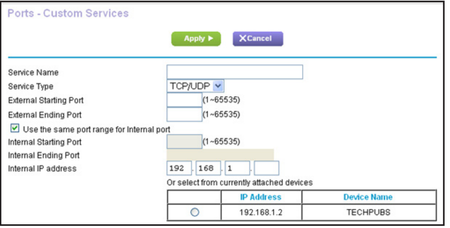
I am trying to port forward for Xbox One. I have read the guide but things are not matching up. THe image shown in the guides does not match up with what I am seeing in my dashboard. The first imag...

TheEther
Jul 23, 2017Guru
The two images are functionally equivalent. The configuration in the 2nd image is set up for the most common use case, which is to forward external port X to internal port X. Just enter the port you want to forward in the field that says External Port Range. Then set Internal IP address to the device that you want to forward the port to.

Asmith68
Jul 23, 2017Aspirant
Thanks for the information. I did the forwarding but when I check them it tells me they are not open or not reachable.
- TheEtherJul 23, 2017Guru
There are two common reasons why port forwarding doesn't work.
- The router is connected to another router. Your ISP modem/gateway may have its own built-in router. This is commonly known as "double NAT". You have to disable the router functions in either the ISP box or your own router.
- The device you are forwarding the port to isn't listening. You need to be running the application (or game in the case of the Xbox) in order for a port tester to return a positive result.