NETGEAR is aware of a growing number of phone and online scams. To learn how to stay safe click here.
Forum Discussion

Loganrun
Sep 13, 2018Tutor
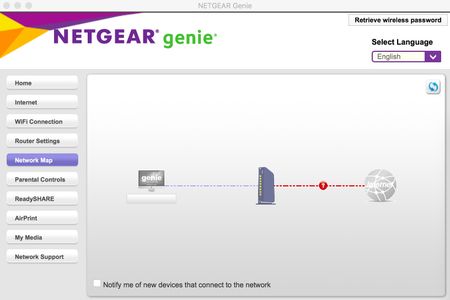
Netgear Genie Version 2.4.38 Troubleshooting
Recently updated Genie desktop software (ver 2.4.38) on Mac (ver 10.13.6). Software will now show Network Map in continual scanning and not update devices. I have uninstalled and reinstalled and st...
Loganrun
Sep 30, 2018Tutor
I am original poster and I have been working with Netgear support but as of today there has been no solution to the device map problem. They see no problem using a R7000 router in their lab and they sent me a new replacement but that still did not fix the problem in my situation. The case number is still open for now. Hopefully more trouble shooting this week.

schumaku
Sep 30, 2018Guru - Experienced User
It's not a specific router model or router firmware problem - both the macOS Genie as well as the Windows Genie are building the Attached Device map partially independent of the existence of any Netgear router - complete odd design. Same issue with an R9000 (1.0.4.12) serving the Internet connection for example, and many more combinations.