NETGEAR is aware of a growing number of phone and online scams. To learn how to stay safe click here.
Forum Discussion

patsch
Apr 18, 2019Tutor
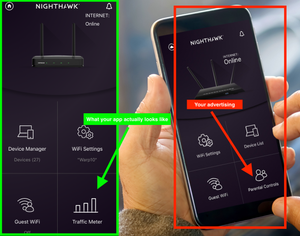
New Nighthawk App - where are the parental controls??
As suggested by Netgear I had set up an OpenDNS account and used the Netgear Genie App to enable / disable the parental controls on demand.
Today I was forced to upgrade to the new Nighthawk Ap...
gojambi
Aug 09, 2019Aspirant
This link is obsolete. Genie app no longer works, replaced by Netgear app. Tried that, searched every option and no parental controls.
DH53001665
Aug 10, 2019Initiate
So I have read this thread. My warrant expired last week. I, like many others, bought this specifically to have detailed control of my network with four teenagers. This change is unacceptable- NETGEAR has not corrected it, therefore I will be forced to remove and sell this router to by one which has the features I want. It will not be a NETGEAR - this router was expensive - I won’t pay a second tie for NETGEAR.
- michaelkenwardAug 10, 2019Guru - Experienced User
You have every reason to feel aggrieved, but if the router still supports parental controls, then the feature is still there, but he way of getting at it has changed.
The app isn't the only way. There might even still be a way to handle it remotely. If so, it would be nice of Netgear told people how to use it.
It is beginning to look like Netgear embarked on a major rework of the Netgear Genie to create the Nighthawk App and, as usual, underestimated how long it would take. There have been a few updates since the original launch, maybe there are more in the works. Customers have just been left in the dust.
- schumakuAug 10, 2019Guru - Experienced User
michaelkenward wrote:You have every reason to feel aggrieved, but if the router still supports parental controls, then the feature is still there, but he way of getting at it has changed. The app isn't the only way. There might even still be a way to handle it remotely. If so, it would be nice of Netgear told people how to use it.
Unfortunately, this is not the full truth . even if my standard answer is about the same as yours. There is functionality lost which was part of the Genie App, when it comes e.g. to enter a bypass account password on a device.
And I'm not fully convinced that some API features for LPC were retained on recent Nightawk model firmware builds, too.
michaelkenward wrote:It is beginning to look like Netgear embarked on a major rework of the Netgear Genie to create the Nighthawk App and, as usual, underestimated how long it would take. There have been a few updates since the original launch, maybe there are more in the works. Customers have just been left in the dust.
Correct! However, there is not much wind coming up cleaning the dust away.
- InsomnixAug 15, 2019Initiate
Netgear has yet to find a solution and after an hour of tickering I found a solution that works.
1 : Find a way to TELNET in to the router.
I used this one here http://www.antinode.info/nte/index.html
2 : run the NTE command to unlock telnet
mine was nte m=11:22:33:aa:bb:cc n=192.168.1.1 u=username p=password
You will see "nte: Received ACK message. Telnet access should be enabled."
3 : use PUTTy and telnet in to the router
4 : use the router credentials to log in to the router
5 : type the following
nvram set ParentalControl=0
6 : Restart router
This did it for me and I know that Netgear is not one to approve of going in through the back door, but I was not about to factory reset the router after they broke the function. You may need to reboot the computer you used or go to a CMD window and use
ipconfig /dnsflush
ipconfig /release
ipconfig /renew

