NETGEAR is aware of a growing number of phone and online scams. To learn how to stay safe click here.
Forum Discussion

Chief-Queef
Sep 26, 2024Aspirant
Inconsistent MR60 WiFi Speeds
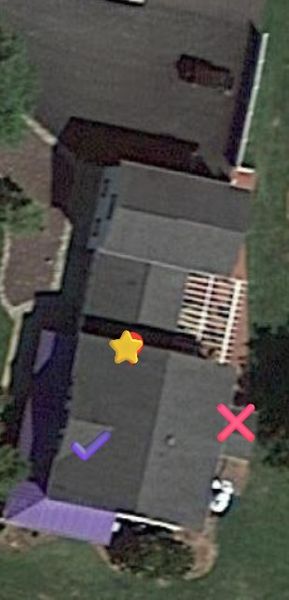
Hello everyone. For a while i have been noticing deteriorating speeds so recently I decided to start running speed test and what i found was scary. So for my Router I have a Netgear CM1150V (I have C...

FURRYe38
Sep 26, 2024Guru - Experienced User
What speeds do you see when directly connected to the CM modem? With out the MR router connected?
Your only getting 95Mbps when ethernet connected to the MR?
What is the distance between the router 📡 and satellite(s)🛰️? 30 feet or more is recommended in between RBR 📡 and RBS 🛰️ to begin with depending upon building materials when wired or wirelessly connected.
Most speeds seen at the MS will not be near 900Mbps. Building materials and distances will be a factor here. Especially wirelessly connected MS. Ethernet, you'd see better speeds.
Any Wifi Neighbors near by? If so, how many?
Please post a copy and paste of the modems connection status and event log page.
https://kb.netgear.com/30007/How-do-I-obtain-the-cable-connection-information-from-a-NETGEAR-cable-modem-modem-router
https://kb.netgear.com/30008/How-do-I-view-or-clear-the-event-logs-on-my-NETGEAR-cable-modem-or-modem-router
.
Be sure your using a good quality LAN cable between the modem and router. CAT6 is recommended.
Chief-Queef
Sep 26, 2024Aspirant
Your only getting 95Mbps when ethernet connected to the MR? - Yes
What speeds do you see when directly connected to the CM modem? With out the MR router connected? For some reason since I'm using an ethernet to USB adapter to laptop it doesn't seem to register anything BUT when i run the Netgear App states that the MR unit is getting that (just did it again now its says 638.38 Download and 23.88 Up with 14ms ping)
What is the distance between the router and satellite(s)️? From Main one in the center of the home to one in kitchen about 30-40 feet . from Main MR to MS on 2nd floor about 30-40ft.
Most speeds seen at the MS will not be near 900Mbps. (I understand that but i would hope to be getting ATLEAST 300 near these devices)
Any Wifi Neighbors near by? If so, how many? We live in farmland with very spacious areas and I only see 1 other WiFi from neighbor (weak signal) thats about it.
- FURRYe38Sep 26, 2024Guru - Experienced User
Can you post the cable connections status page data please:
Please also try a speed test using Ooklas installable speed test app on the Laptop.
- Chief-QueefSep 26, 2024Aspirant
The speeds mentioned in my post where all from Ookla 😞
- FURRYe38Sep 26, 2024Guru - Experienced User
You have lots of correctables and un-correctables that should be mostly zeros.
Have the ISP check the signal and line quality UP to the modem. Be sure the ISP provisions the modem correctly.
Be sure there are no coax cable line splitters in the between the modem and ISP service box.
Be sure your using good quality RG6 coax cable up to the modem.
Start with removing any amplifiers, signal attenuators, or splitters from the coax.
From there check the line for kinks, damage, moisture in the line.
Check the connectors for improperly made ends, foil touching the copper coax line, loose connections, bad/old/cheap connectors, or corroded connections. Replace them if you do.
Be sure to power OFF the modem for 1 minute then back ON.
https://community.netgear.com/t5/Cable-Modems-Routers/General-info-and-Troubleshooting-for-Cable-Modems/m-p/1530376#M12853
https://kb.netgear.com/24311/Power-level-guidelines-for-a-NETGEAR-cable-modem-router
https://www.duckware.com/tech/solving-intermittent-cable-modem-issues.html