NETGEAR is aware of a growing number of phone and online scams. To learn how to stay safe click here.
Forum Discussion

JoeFromSD
May 28, 2024Aspirant
MR60 Mesh Wifi, Red Light
OK Folks, the Mesh WiFi 6 Router has a solid red light, but shouldn't it be green? I have wifi / internet access on the desktop so it is working. Am I good? If not what do I do now? I unplugged it t...
JoeFromSD
Jun 14, 2024Aspirant
OK my tech guy came by, he spent quite a bit of time on it but got the blue light back!
but then this morning the red light was back .. I had to unplug it, and reboot the router.
why did that happen like that? Is there a fix for this issue??

FURRYe38
Jun 14, 2024Guru - Experienced User
Would be something at the ISP service/Modem or ONT that the MR is not getting a good signal from.
What Firmware version is currently loaded?
What is the Mfr and model# of the Internet Service Providers modem/ONT the NG router is connected too?
ISP needs to check there signal up to the ISP modem/ONT. Have them check the logs here.
- JoeFromSDJul 27, 2024Aspirant
I'm still having an issue with having to reset the router. Why do I need to do that about once a week? Is that normal??
what could I try to stop this happening?
- michaelkenwardJul 28, 2024Guru - Experienced User
JoeFromSD wrote:
what could I try to stop this happening?
Let's try to keep this simple. One thing at a time. None of the usual boilerplate answers that assume too much knowledge at the receiving end.
Start by answering the various questions that you have been asked before.
Here's just some of them?
How did you configure the Panoramic Wifi Gateway from Cox? (Which model do you have?) Is it still working as a router? Or did you put the MR60 into access point mode? What did the Gateway indicate when this happened?
Your first message didn't have much to go on.
The first answer you got asked the same questions:
What is the Mfr and model# of the Internet Service Providers modem/ONT the NG router is connected too?
We ask because it is an important detail.
Your answer:
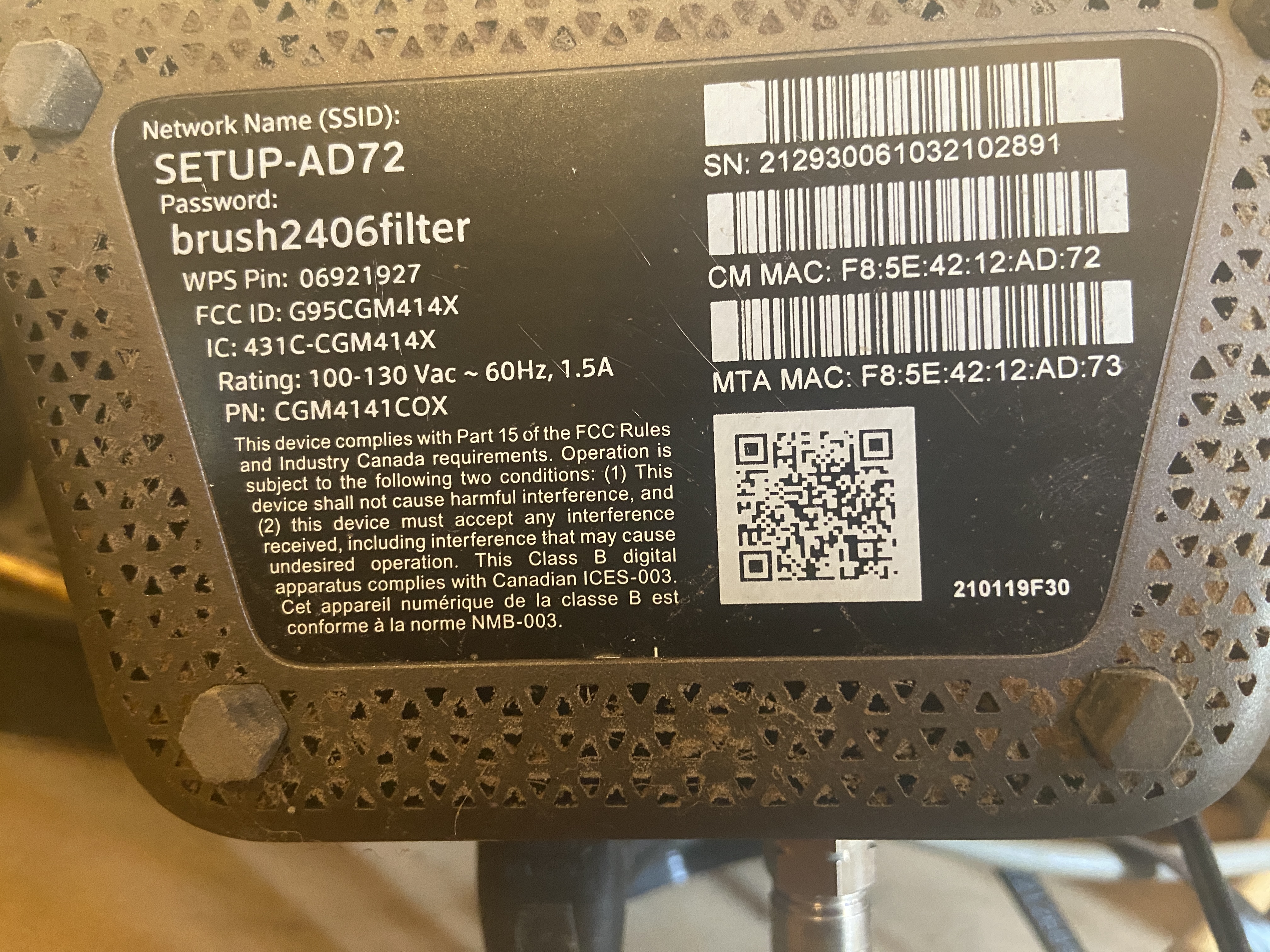
modem is DOCSIS 3.1 Dual Band Wi-Fi 5 (802.11ac) Panoramic Wifi Gateway from Cox
Does not have enough detail, but the "gateway" word does suggest that you may have a modem/router.
Most devices have a label in the bottom. Here's one from a Netgear device:
Look for something similar on your gateway and report back here.
- JoeFromSDJul 28, 2024Aspirant
OK I'm trying but I don't understand the tech talk so I'm going to have to wait until the tech guy who installed this gets back from vacation ,
but here is the Info on the cox modem! You prob need that other Info but I hope this helps a little?
- JoeFromSDJul 28, 2024Aspirant
I went again to 192.168.1.1, and now it's asking for a password and some Info, city where born and best friends name, and isn't accepting my answers ( 1 Net.png)
- michaelkenwardJul 28, 2024Guru - Experienced User
JoeFromSD wrote:
but here is the Info on the cox modem! You prob need that other Info but I hope this helps a little?
Your modem has an SSID and wifi password. That means that it is a modem/router. So you are running two routers on your network.
Two routers on your network can cause headaches. For example, you can end up with local problems with addresses on your network. Among other things, the other router can misdirect traffic to addresses that the Netgear router usually handles, such as routerlogin.net or the usual default IP address for a router, 192.168.1.1.
This explains some of the other drawbacks.
What is Double NAT? | Answer | NETGEAR SupportI am surprised that your "tech guy" didn't spot this immediately. It is a common issue that we see here all the time, and most of us aren't professional tech people.
Unless you have specific reasons for using two routers – to create two separate networks for example – it is often easier to use just one router and then to set up the second router as a wifi access point (AP) with a wired connection to the main router. Netgear advises this, as does just about every site you will visit.
How do I change my NETGEAR router to AP mode? | Answer | NETGEAR Support
But that has its own drawbacks:Disabled Features on the Router when set to AP Mode | Answer | NETGEAR Support
It may be possible to put the modem/router into modem only (bridge) mode and then to use the second device as the router. You'll have to ask Cox, or your tech guy, how to go about that.Maybe that is what he did to get things working and you broke it by resetting the router at some stage. That puts it back into router mode.
- michaelkenwardJul 28, 2024Guru - Experienced User
JoeFromSD wrote:
I went again to 192.168.1.1, and now it's asking for a password and some Info, city where born and best friends name, and isn't accepting my answers ( 1 Net.png)
If you are talking about access to the browser's graphical user interface (GUI), the router's controls, these are on the label for your device, along with the default wifi login details. The username is fixed at admin. The default password is password.
If you are trying to use the "password recovery" option, there is a bug in Netgear's implementation of password recovery on some devices. You can get locked into a closed loop.
If password recovery is enabled, but you have not set the answers to the questions, it keeps sending you back to the beginning of the process. If you haven't already given the thing your personal answers, they are not in its memory and it has no way of knowing if they are correct.
If the standard factory password (password) does not work, then you will have to factory reset the thing to get back to that. Then either disable password recovery (check the manual for your device) or provide some answers to those questions.How do I perform a factory reset on my NETGEAR router? | Answer | NETGEAR Support
- JoeFromSDJul 28, 2024Aspirant
OK Michael I appreciate the help on a Sunday! I'll come back when I've talked with the tech guy!