NETGEAR is aware of a growing number of phone and online scams. To learn how to stay safe click here.
Forum Discussion

cs47
Jan 21, 2022Tutor
MR60/MS60 - Ethernet backhaul creates network loop
I have an MR60 router connected to the internet and 2 MS60 satelites connected with an ethernet (cat-6) backhaul. I bought this device at Costco - strange that the model number is not listed in the ...

FURRYe38
Jan 21, 2022Guru - Experienced User
What Firmware version is currently loaded?
What is the Mfr and model# of the Internet Service Providers modem/ONT the NG router is connected too?
How are the MS connected to the MR? Directly to the back of the MR or is there a LAN switch in between the MR and the MS?
If there is a LAN switch, brand and model# please.
What CAT# cables are you using? CAT6 is recommended.
Check cables between the MR and MS.
Is both MS doing this or only one?
Swap MS locations with each other to see if problem follows.
- TheBoroerJan 24, 2022Aspirant
I just want to chime in and say i'm experiencing the same issues.
I just upgraded to 1.1.6.122 yesterday on all devices to see if that fixed the issue but it doesn't.
I have one MR60 and two MS60 devices connected via cat6 ethernet cables to a Mikrotik RB5009 router (I also tried having them connected via an unmanaged switch with the same result). The netgear mesh system is configured to be running in Access Point mode (AP Mode).
All 3 netgear devices are connected directly to the mikrotik router and I see loop detection warnings in the mikrotik logs.
- FURRYe38Jan 24, 2022Guru - Experienced User
If your ethernet connecting the MS, they need to be connected to the back of the MR, not in parallel at the host router.
ISP Modem>Host router><>MR in AP mode<Unmanaged LAN switch<>MS connected to Lan Switch.
TheBoroer wrote:
I just want to chime in and say i'm experiencing the same issues.
I just upgraded to 1.1.6.122 yesterday on all devices to see if that fixed the issue but it doesn't.
I have one MR60 and two MS60 devices connected via cat6 ethernet cables to a Mikrotik RB5009 router (I also tried having them connected via an unmanaged switch with the same result). The netgear mesh system is configured to be running in Access Point mode (AP Mode).
All 3 netgear devices are connected directly to the mikrotik router and I see loop detection warnings in the mikrotik logs.
- redcdaleJan 31, 2022Tutor
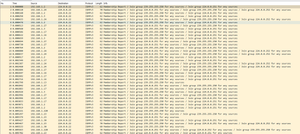
I'm seeing the exact same thing. I've been using firmware 1.1.6.122_2.0.58 since sometime in December, and I've run into the loop issue twice. The first time, I used wireshark to trace down the offending device, and after turning it off, I still saw the packet storm. Only when I disconnected one of the ethernet backhaul cables connected to one of my MS60s did it stop.
I'm suspecting that the satellite(s) are somehow enabling both the ethernet and the wifi backhaul and this is causing a loop. Is there any way to confirm/deny this? I wish Netgear would give us some more control make sure the wifi backhaul is disabled.
- FURRYe38Feb 01, 2022Guru - Experienced User
How is the MS connected to the MR? Directly behind the MR or is there a LAN switch in between or is the MS connected to a different router with the MR in parallel?
redcdale wrote:
I'm seeing the exact same thing. I've been using firmware 1.1.6.122_2.0.58 since sometime in December, and I've run into the loop issue twice. The first time, I used wireshark to trace down the offending device, and after turning it off, I still saw the packet storm. Only when I disconnected one of the ethernet backhaul cables connected to one of my MS60s did it stop.
I'm suspecting that the satellite(s) are somehow enabling both the ethernet and the wifi backhaul and this is causing a loop. Is there any way to confirm/deny this? I wish Netgear would give us some more control make sure the wifi backhaul is disabled.
- cs47Feb 01, 2022TutorHardware Version MR60 Firmware Version V1.0.6.116_2.0.54
This device is connected directly to the Verizion FIOS termination equipment - I returned the Version modem and router.
Everything is CAT-6 cabling although one of them is long - 30FT to get from the garage where the MR60 is located to the satelites in the main house.
There are 2 GS 108T switches in the network.
FIOS <-> MR60 <-> GS108T <-- long cable --> GS108T <-> MS60
At one point I remove the far switch and just connected the MS60 directly to the first switch but that didn't seem to make a difference.
- FURRYe38Feb 01, 2022Guru - Experienced User
What happens if you remove both switches and set the MS directly connected to the MR?
cs47 wrote:
Hardware Version MR60 Firmware Version V1.0.6.116_2.0.54This device is connected directly to the Verizion FIOS termination equipment - I returned the Version modem and router.
Everything is CAT-6 cabling although one of them is long - 30FT to get from the garage where the MR60 is located to the satelites in the main house.
There are 2 GS 108T switches in the network.
FIOS <-> MR60 <-> GS108T <-- long cable --> GS108T <-> MS60
At one point I remove the far switch and just connected the MS60 directly to the first switch but that didn't seem to make a difference.
- cs47Feb 01, 2022Tutor
It sometimes takes a few days or a week for the situation to occur. I can't have my home network offline for that long.
Some of my devices are hard-wired only and without a switch I can not use them.
Also, as there is only one port on each device, it isn't possbile to configure them all without at least 1 switch.