NETGEAR is aware of a growing number of phone and online scams. To learn how to stay safe click here.
Forum Discussion

jwersan
Nov 21, 2024Tutor
MR80 crashes/resets several times a day
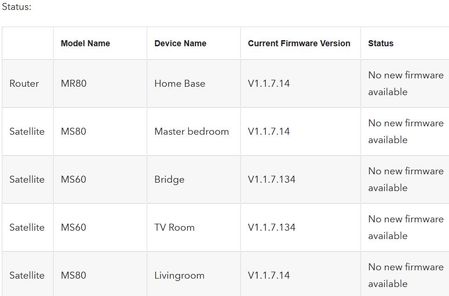
I've had the MR80 and its two MS80s for over a year, maybe two at least. I also have two MS60s hanging off of it, all are working as expected, I.E. connectivity. Since I initially set it up, I've h...

michaelkenward
Nov 22, 2024Guru - Experienced User
What modem/gateway/ optical network termination (ONT) connects you to the Internet?
Just another user with time on their hands.
jwersan
Nov 22, 2024Tutor
michaelkenward wrote:What modem/gateway/ optical network termination (ONT) connects you to the Internet?
Just another user with time on their hands.
I have comcast with their XB7 cable modem wired into the MR80.
- plemansNov 22, 2024Guru - Experienced User
the XB7 is a modem/router combo device. Is it in passthrough mode or the MR80 in access point mode? Otherwise you're in a double nat
- michaelkenwardNov 23, 2024Guru - Experienced User
jwersan wrote:
I have comcast with their XB7 cable modem wired into the MR80.
That looks like a "gateway", a combined modem/router. So you have added a router to a router.
Overview of Xfinity Gateways - Xfinity Support
Two routers on your network can cause headaches. For example, you can end up with local problems with addresses on your network. Among other things, the other router can misdirect traffic to addresses that the Netgear router usually handles, such as routerlogin.net or the usual default IP address for a router, 192.168.1.1.
This explains some of the other drawbacks.
What is Double NAT? | Answer | NETGEAR Support
Unless you have specific reasons for using two routers – to create two separate networks for example – it is often easier to use just one router and then to set up the second router as a wifi access point (AP) with a wired connection to the main router. Netgear advises this, as does just about every site you will visit.How do I change my NETGEAR router to AP mode? | Answer | NETGEAR Support
But that has its own drawbacks:Disabled Features on the Router when set to AP Mode | Answer | NETGEAR Support
It may be possible to put the modem/router into modem only (bridge) mode and then to use the second device as the router.
Just another user with time on their hands.
