NETGEAR is aware of a growing number of phone and online scams. To learn how to stay safe click here.
Forum Discussion

KaraBond
Oct 26, 2022Tutor
Slow wireless speed MR60
Hi, I am looking for some help as I am getting really slow wireless speeds from my MR60 mesh wifi. We are in the UK we have OFNL fibre broadband provided by Ashford, up to 900mbps. We the...
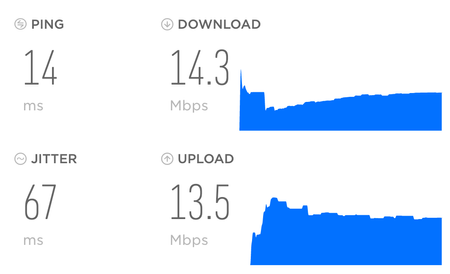
- Oct 28, 2022
KaraBond wrote:
Wired to the router I get:
Ok so we know wired is GOOD.
I have 27 devices connected wirelessly at the minute, that is made up of a mixture of:
multiple iPhones & MacBooks (5GHz), a PC (5GHz), several Apple HomePods (5GHz), Ring security devices (2.4 GHz), tvs (5 GHz), washing machine (2.5GHz), 3 sky boxes (satellite tv).
We have 1 MS, however almost everything is showing as connected to the MR, anything connected to the satellite is on 2.4 GHz.
Wired: Philips hue bridge, Tado bridge, ring bridge, sky master box.
Are there any specific wifi settings do you want?
2.4GHz channel is set to auto, 5GHz is set to 44, and its using WPA2-Personal security.
Try channel 1 and 40 on the MR.
I don't understand this question: Any Wifi Neighbors near by? If so, how many?
Do you have home neighbors near by with wifi signals?
- our sky boxes have their own wifi network, otherwise there are no other wifi networks in the area. What happens if you turn these sky boxes and all bridged OFF? I'd turn off all wireless devices and test with just one Iphone or pad with the MR and see if speeds are still low.

KaraBond
Oct 28, 2022Tutor
Wired to the router I get:
I have 27 devices connected wirelessly at the minute, that is made up of a mixture of:
multiple iPhones & MacBooks (5GHz), a PC (5GHz), several Apple HomePods (5GHz), Ring security devices (2.4 GHz), tvs (5 GHz), washing machine (2.5GHz), 3 sky boxes (satellite tv).
We have 1 MS, however almost everything is showing as connected to the MR, anything connected to the satellite is on 2.4 GHz.
Wired: Philips hue bridge, Tado bridge, ring bridge, sky master box.
Are there any specific wifi settings do you want?
2.4GHz channel is set to auto, 5GHz is set to 44, and its using WPA2-Personal security.
I don't understand this question: Any Wifi Neighbors near by? If so, how many? - our sky boxes have their own wifi network, otherwise there are no other wifi networks in the area.

mnzs-blen
Oct 28, 2022Aspirant
That’s lot many devices wirelessly connected.
Bandwidth of 1800mbps is MR and MS capacity. This will get distributed to various devices. I would recommend to do the speedtest connecting just one wireless device on 5Ghz.
Also, MS uses same wifi as backhaul to connect MR and there’s no dedicated wireless backhaul connection hence drop in speed when connected so MS is expected.
Orbi mesh systems has dedicated wireless backhaul connection to the main router.
Bandwidth of 1800mbps is MR and MS capacity. This will get distributed to various devices. I would recommend to do the speedtest connecting just one wireless device on 5Ghz.
Also, MS uses same wifi as backhaul to connect MR and there’s no dedicated wireless backhaul connection hence drop in speed when connected so MS is expected.
Orbi mesh systems has dedicated wireless backhaul connection to the main router.
- mnzs-blenOct 28, 2022AspirantToo many wifi networks in the neighbourhood will create interface to the wifi signal that in turn will create confusion in the network hence there are channels 1 to 13 in 2.4Ghz and 5Ghz has 161+ depending on the country that you have selected in the router.
Network channel interference due to crowded wifi networks in your neighbourhood can be viewed on a android Nighthawk app but not on iOS !!