NETGEAR is aware of a growing number of phone and online scams. To learn how to stay safe click here.
Forum Discussion

JKirk10
Apr 19, 2020Tutor
AC1900 Router with 24 x 8 DOCSIS 3.0 Cable Modem keeps dropping connection
Good afternoon, So, for the last few months (before the COVID work-at-home overloading networks), my internet has been dropping out. At this point, it's a near-daily thing. Both hardwire and Wi-F...
JKirk10
Apr 19, 2020Tutor
1. Model is C7000v2 (I apologize for the oversight)
2. V1.03.01?
3. It's a Modem/Router (an answer I'm sure you could have reached had I not forgotten to put that in. Again, I'm terribly sorry about that)

plemans
Apr 19, 2020Guru - Experienced User
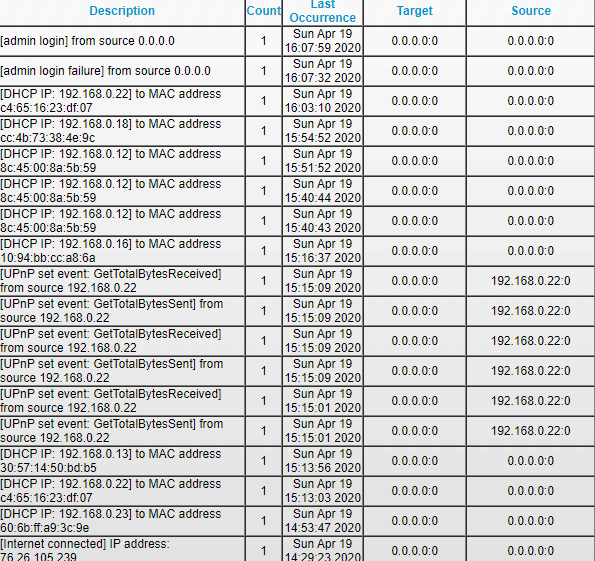
Do you have any screen snips of your modem's cable connection page?
As well as your logs?
When the router goes out, does both wired and wireless devices drop?
Any amplifiers hooked to the C7000?
What devices are hardwired into the C7000?
- JKirk10Apr 19, 2020Tutor
I don't know how to add more than one picture in this post, so i'll add the following three after this one in seperate posts :/ (Again, I'm sorry. NOT tech savvy in the slightlest.)
Both wired and wireless drop
No amplifiers
One PC and one gaming console (PS4 if thats required)
- JKirk10Apr 19, 2020Tutor
- JKirk10Apr 19, 2020Tutor
- JKirk10Apr 19, 2020Tutor
- plemansApr 19, 2020Guru - Experienced User
your signal looks pretty good from what I can tell.
And if you're had it replaced once already, it makes it less likely a router issue. Not saying it isn't but having 2 bad routers back to back is pretty slim odds.
When it happens, is the C7000 rebooting? What happens to the led's on it?
Kind of limits it to a few things since its happening ot both wired and wireless devices.
1. power spikes off the power outlet.----try hooking up to a different outlet/surge protector
2. Again, maybe the outlet is actually having power failure. try a different outlet that you know is good. Or even to a backup power supply if you've got one.
3. power spike/issue with the coax line. Make sure that the coax line is grounded where its entering the house. Usually there's a junction box where the isp line enters the home and it should have a ground connection there.
4. power problem with a device connected to the router. Maybe something is feeding back to the router from a connected device or one of its cables is worn through. try disconnecting the hardwired in devices. Try just running wireless for a bit and see if the issue re-occurs.
Like I said, the line looks pretty good and I'm suspicious of the devices/lines connected to the router because its been replaced once.